

A production-ready post production workflow runs in this order: project setup → ingest and backup → proxy (offline) editing → picture lock → reconform to camera originals → finishing (VFX, color, audio) → QC and delivery → archive. Follow that sequence and you eliminate the category of problems that derails most projects: relinks that fail at 2 AM, color grades applied to the wrong resolution, and sound mixes delivered to a locked picture that nobody actually locked.
TL;DR checklist before you read further:
- Apply the 3-2-1 backup rule at ingest: three copies, two media types, one offsite.
- Generate proxies immediately on ingest, frame-for-frame with matching timecode.
- Enforce a single folder and naming convention before any editor touches the media.
- Require a signed picture-lock signoff before finishing begins — no exceptions.
- Run the offline-to-online reconform against the original camera media, not a transcode of a transcode.
- Deliver stems, not just a stereo mix, to every platform that requires them.
- Archive to LTO or cold cloud storage (AWS S3 Glacier) before the project drive gets repurposed.
- Validate every deliverable with both automated and human QC passes.
Table of Contents
- What makes a post production workflow worth building?
- How does the post production pipeline break down stage by stage?
- How should you handle data management and ingest?
- How do you run the offline edit through to picture lock?
- How do VFX plates and conform handoffs work?
- What does a colorist need before grading begins?
- What does sound finishing require?
- How should review and approval rounds be structured?
- What does final delivery and QC require?
- Who owns what, and how long does each stage take?
- Offline-to-online reconform checklist: avoiding the most common failures
- Key Takeaways
- The part of post production workflows most teams get wrong
- MINIM handles the workflow so your team handles the creative
- Useful sources and further reading
What makes a post production workflow worth building?
A post-production workflow is not a to-do list. It is an ordered system of repeatable decisions — codec choices, naming conventions, milestone signoffs — that removes the need to make the same judgment call twice. The difference matters because every hour an editor spends hunting a missing media file or untangling a broken relink is an hour not spent on the cut.
Front-loading standards is where most teams fail. Decisions about capture format, color space, and folder structure feel administrative on day one, but they become structural by the time you hit the conform. If a camera operator shoots in a mix of frame rates because nobody specified otherwise, the editor finds out at the worst possible moment. Starting workflow planning in pre-production — standardizing camera settings, codecs, and naming conventions before a single card is offloaded — prevents that class of problem entirely.
Three principles should be locked before any media moves:
- Proxy-first workflow: — proxies generated at ingest, frame-accurate, so the offline edit can relink automatically at conform.
Teams that skip any one of these don't fail on creative grounds. They fail on structural ones.
How does the post production pipeline break down stage by stage?
The Frame.io workflow guides map the full capture-to-delivery lifecycle and treat the conform as a translation between editorial and finishing — a useful frame for understanding why each stage exists.
The conform is not a technical formality. It is the moment where every upstream decision about naming, timecode, and folder structure either pays off or comes due. Teams that treat it as a formality discover their debt at the worst possible time.
Stage-by-stage pipeline:
| Stage | Goal / Output | Timeline position | Common formats / codecs | Recommended tools | Handoff artifacts |
|---|---|---|---|---|---|
| Project setup | Folder structure, naming convention, codec spec | Pre-production | N/A | Production management software | Spec sheet, folder template |
| Ingest & backup | Verified camera media, proxies, 3-2-1 copies | Day 1 of post | Camera RAW, ARRIRAW, R3D, ProRes | Silverstack, YoYotta, DaVinci Resolve | Checksum report, proxy files |
| Offline editing | Assembly → rough cut → fine cut → picture lock | Weeks 1–N | ProRes Proxy, DNxHD LT | Adobe Premiere Pro, Avid Media Composer, DaVinci Resolve | Locked timeline, EDL/AAF/XML, selects list |
| VFX / conform | Plates pulled, temp comps, relink to originals | After picture lock | EXR, TIFF, ProRes 4444 | DaVinci Resolve, After Effects, Nuke | Pull list, VFX notes, conformed timeline |
| Color grading | Primary/secondary grade, deliverable masters | After conform | DPX, ProRes 4444 XQ, EXR | DaVinci Resolve | Graded master, LUTs, CDL values |
| Sound design & mix | Dialogue, SFX, Foley, stems, loudness-compliant mix | Parallel with color | BWF, AAF, OMF | Pro Tools, Logic Pro | Stems, M&E track, mix notes |
| QC & delivery | Verified masters, captions, metadata | Final stage | ProRes, MXF | Telestream Vantage, Vidchecker | Delivery package, QC report |
| Archive | Long-term storage, retrieval-ready | Post-delivery | LTO tape, cold cloud | LTO drives, AWS S3 Glacier | Archive manifest, checksums |
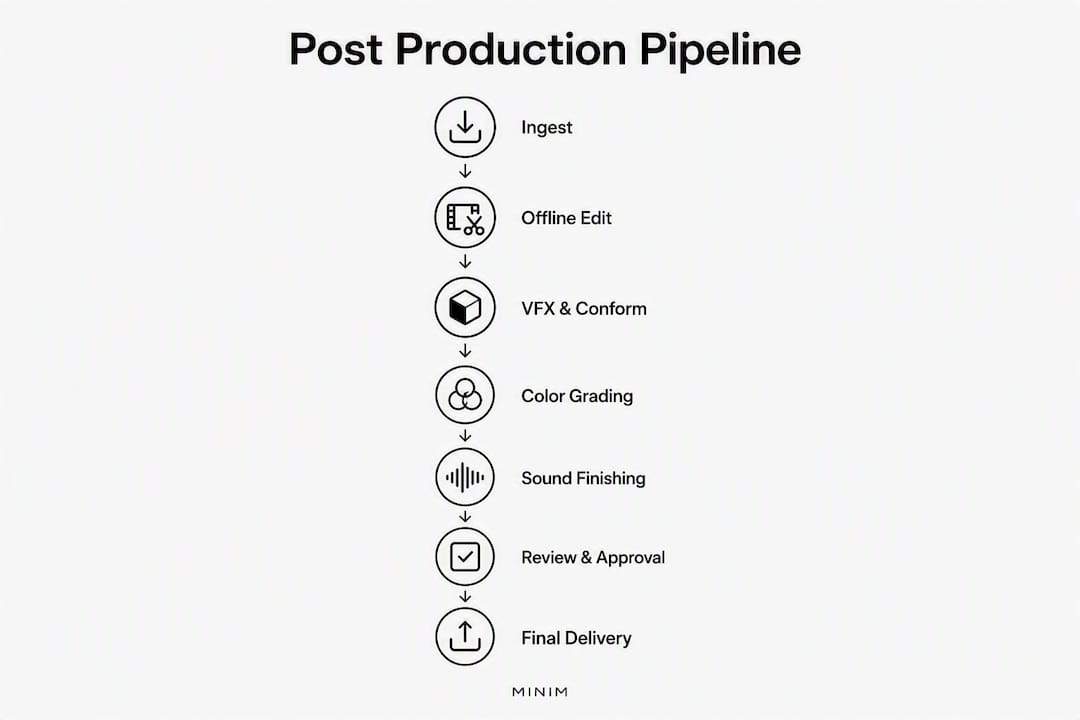
Pro Tip: Build the stage table into your project kickoff document and assign an owner to each row. Ambiguity about who owns the conform or the QC pass is how finishing schedules collapse.
How should you handle data management and ingest?
Ingest failures and missing checksums cause more project delays than almost anything else in post. The fix is not complicated, but it requires discipline on day one.

The non-negotiable rule: checksum every offload before you erase a camera card. Use MD5 or xxHash. If the checksum fails, offload again. Never delete source media until you have confirmed two verified copies exist.
Folder structure and naming
A workable project folder looks like this:
PROJECT_ClientName_ProjectTitle_YYYY/
  ├── 01_CAMERA_ORIGINALS/
  │   ├── A001/
  │   └── B001/
  ├── 02_PROXIES/
  ├── 03_AUDIO/
  ├── 04_GRAPHICS/
  ├── 05_VFX/
  ├── 06_EXPORTS/
  │   ├── ROUGH_CUT/
  │   └── DELIVERABLES/
  └── 07_ARCHIVE/
Minimum metadata fields per clip: project name, client, sequence/scene, camera ID, shoot date, version, editor initials. Lock this convention in the spec sheet before cameras roll.
Backup and archive tiers
- Hot storage (on-prem NAS or SAN): working media for active editing. Fast read/write, expensive per terabyte.
- Warm storage (cloud object storage like AWS S3 Standard): secondary backup, accessible within minutes.
- Cold archive (LTO tape or AWS S3 Glacier): long-term retention. LTO-8 and LTO-9 offer high capacity at low cost per terabyte and remain the industry standard for broadcast and film archives. For media asset management at scale, pairing on-prem LTO with a cloud cold tier gives you both physical redundancy and geographic separation.
Pro Tip: Write the archive manifest as a plain-text CSV with file paths, checksums, and tape/bucket IDs. A manifest that lives only inside proprietary software becomes unreadable the moment you stop paying for that software.
Proxies and codecs
Generate proxies at ingest, not later. The proxy must match the original's frame rate, frame size ratio, and timecode exactly — frame-for-frame — so the NLE can relink automatically at conform. Common proxy targets:
- ProRes Proxy: good default for Apple Silicon and Premiere Pro workflows.
- DNxHD LT / DNxHR LQ: preferred for Avid Media Composer pipelines.
- H.264 at 1/4 resolution: acceptable for review-only proxies, not for offline editorial.
Transfer methods
For large-file transfers between facilities, MASV handles multi-gigabyte deliveries reliably over standard internet connections without the file-size caps that plague consumer tools. For projects where drives must ship physically, use encrypted drives with a verified checksum file included in the shipment.
How do you run the offline edit through to picture lock?
Proxy-first offline editing prevents hardware bottlenecks and keeps finishing passes reserved for the finalized sequence. The editorial pass has four distinct phases:
- Assembly cut: every selected take in sequence order, no trimming for pace. Goal is coverage, not watchability.
- Rough cut: scene-level pacing established, obvious trims made, temp music and SFX placed for tone reference.
- Fine cut: shot-level trimming, dialogue tightened, transitions refined. This is where most review rounds happen.
- Picture lock: the edit is frozen. No frame changes after this point without a formal change order.
At picture lock, deliver:
- Locked timeline file (Premiere Pro
.prproj, Avid.aaf, or DaVinci.drp) - EDL and/or AAF/XML for conforming in the finishing NLE
- Proxy-to-original mapping document
- Selects list with timecodes
- A signed picture-lock approval from the client or director
Versioning rules: label every export with a version number and date (ProjectName_v03_20260415). Never overwrite a previous version. Plan for three to five review rounds on a standard commercial project; anything beyond that usually signals an unclear brief, not an editing problem.
Pro Tip: Before handing off to finishing, run an editor-side QC pass. Check for: frame-rate mismatches between clips, field-order inconsistencies on interlaced material, audio sync drift on long takes, and any offline media that didn't relink cleanly. Catching these takes 20 minutes. Missing them costs a day.
How do VFX plates and conform handoffs work?
The rule for VFX is simple: isolate shots early, provide full-resolution plates, and tie everything to timecode. Surprises at the conform stage almost always trace back to a VFX team that received compressed editorial media instead of camera originals.
Required VFX handoff items:
- Pull list with shot names, timecodes, and frame handles (typically 8–16 frames on each side)
- Full-resolution plates: camera originals or EXR/TIFF sequences for shots requiring compositing
- Editorial reference (H.264 or ProRes LT export of the locked sequence)
- Temp comps where applicable, clearly labeled as temporary
- Tracking data files where camera tracking was performed on set
- Shot-specific notes file (frame range, comp notes, delivery format)
For the conform itself: relink proxies to originals in the finishing NLE, then do a frame-accurate playback check on every VFX shot. Confirm color space is consistent (log vs. display-referred), check for dropped frames, and verify that VFX deliveries match the frame count and handle length specified in the pull list.
Pro Tip: Version VFX deliveries with a shot code and version number in the filename: SH010_comp_v04.exr. Never accept a VFX delivery labeled "final" — label it with a version number and date so you know exactly what you conformed against if a revision comes in later.

What does a colorist need before grading begins?
Hand the colorist full-resolution media, a locked timeline, reference frames, and an agreed color-space target. Grading on an unlocked timeline or the wrong color space costs everyone time.
Color handoff checklist:
- Conformed timeline in DaVinci Resolve (or an XML/AAF the colorist can import)
- Full-resolution camera originals linked and verified
- Reference stills: director's intent frames, any approved looks from the agency
- Camera LUTs for any log formats used (ARRI LogC3, Sony S-Log3, RED IPP2)
- CDL values or ACES notes if a on-set DIT established a base look
- Agreed deliverable list: Rec.709 master, P3/D65 for theatrical, HDR10 or Dolby Vision if required
Deliverable format recommendations:
- Rec.709 master: ProRes 4444 or ProRes HQ at native resolution.
- P3/D65 (theatrical): DPX or ProRes 4444 XQ.
- HDR10: ProRes 4444 XQ or HEVC at 10-bit minimum.
On LUT usage: apply camera LUTs as monitoring LUTs during the grade, not baked into the output. Bake a LUT only when the deliverable spec explicitly requires it (some broadcast workflows do). Keeping LUTs unbaked preserves flexibility for re-delivery in a different color space later.
HDR vs. SDR: if you're delivering both, grade the HDR master first and trim-pass for SDR. Grading SDR first and expanding to HDR almost always produces a flat, unsatisfying HDR result.
What does sound finishing require?
Deliver properly labeled stems, a locked picture reference, and an editorial notes sheet to the sound team. A mixer who receives an unlabeled OMF and a rough-cut reference will spend the first day just organizing, not mixing.
Sound prep checklist:
- Locked picture reference (H.264 or ProRes LT, burned-in timecode)
- OMF or AAF export from the NLE with handles (at least 1 second per side)
- Dialogue tracks separated from music and SFX in the export
- ADR schedule with scene numbers, lines, and character names
- SFX sourcing notes (licensed library cues, custom recordings)
- Foley notes for any on-set sound that needs replacement
Delivery steps for the mixer:
- Import AAF/OMF into Pro Tools and verify sync against the locked picture reference.
- Clean dialogue: noise reduction, de-essing, room-tone fill for cuts.
- Record and integrate ADR.
- Build SFX and Foley layers.
- Mix to loudness spec: -24 LKFS ± 2 LU for U.S. broadcast (ATSC A/85), -14 LUFS integrated for most streaming platforms (Spotify, Apple Music), and -16 LUFS for YouTube.
- Deliver stems: dialogue, music, SFX, and M&E (music and effects) as separate files.
- Export a stereo mix and a 5.1 or 7.1 mix where the platform requires it.
Pro Tools remains the standard DAW for professional sound finishing in the U.S. market. OMF exports work for simple projects; AAF is preferred for complex multi-track sessions because it preserves more metadata and handles larger file sizes without the 2 GB OMF cap.
Closed captions and subtitles: deliver SRT or SCC files alongside the video master. Most U.S. streaming platforms require CEA-608 or CEA-708 caption formats for broadcast compliance.
How should review and approval rounds be structured?
Designate a single review platform for frame-accurate notes and require all feedback to be anchored to a specific timecode. Scattered feedback in email threads, Slack messages, and PDF annotations is the primary reason review rounds multiply beyond what was scoped.
Recommended review tools:
- Frame.io: frame-accurate comments, version stacking, and client-facing review links. Widely used across U.S. post facilities.
- Evercast: real-time streaming review with video call integration, suited for remote sessions with directors and agency clients.
Streaming proxies remove the need for reviewers to download large files, which speeds approvals and lowers storage egress costs for remote teams.
Review round process:
- Submit a versioned export to the review platform with a clear deadline for notes.
- Reviewers comment on timecode-anchored frames only — no general emails accepted.
- Editor consolidates notes, flags any that conflict or require a scope decision, and implements approved changes.
- Resubmit as a new version; previous versions remain accessible for comparison.
- Lock the round formally: once a version is approved, no retroactive notes on that version are accepted.
Pro Tip: Set a note-submission deadline for each review round to help maintain the schedule. Notes that arrive after the deadline go into the next round or trigger a change order. This single rule prevents the most common cause of schedule drift.
A review platform is only as effective as the process around it. The tool does not prevent scope creep — the process does.
What does final delivery and QC require?
Run a multi-pass QC against the delivery spec before anything leaves the facility. Automated checks catch codec and loudness issues reliably; human review catches the things automation misses — a subtitle that overlaps a lower-third, a color shift on a single frame, audio clipping on a specific line of dialogue.
Human-led multi-pass QC is still required despite automation — practitioners recommend combining automated and human inspection before final delivery.
Delivery spec table:
| Destination | Codec / container | Bit rate | Audio config | Caption format |
|---|---|---|---|---|
| Netflix | ProRes (per spec) | Per Netflix delivery spec | 5.1 + stereo | TTML / Netflix TTML |
| YouTube | MP4 | — | Stereo or 5.1 | SRT or SCC |
| Broadcast (U.S.) | XDCAM HD / MXF | — | Stereo + 5.1 | CEA-608 / CEA-708 |
| Theatrical (DCP) | MXF | — | 5.1 or 7.1 | SMPTE subtitles |
| Social (Instagram/TikTok) | MP4 | — | Stereo | SRT |
QC checklist:
- Codec and container verified against spec.
- Frame rate and resolution confirmed.
- Loudness measured: integrated LUFS, true peak, and LRA within spec.
- Closed captions present, timed correctly, and in the required format.
- Color space validated (no accidental log output in a Rec.709 deliverable).
- No dropped frames, freeze frames, or black frames in the program.
- Watermark removed (or present, if required for screener delivery).
- MD5 checksum generated and included with the delivery package.
Pro Tip: Generate the QC report as a PDF and attach it to the delivery package. Platforms and broadcasters increasingly require it, and it protects you if a rejection comes back weeks later.
Archive: apply the 3-2-1 rule one final time post-delivery. Camera originals, project files, and deliverable masters go to LTO tape for physical long-term storage. A second copy goes to AWS S3 Glacier or a comparable cold cloud tier for geographic redundancy. Keep the archive manifest in a plain-text format that doesn't depend on any specific software to read.
Who owns what, and how long does each stage take?
The critical roles in a post production pipeline and their primary deliverables:
- Post supervisor: owns the schedule, the spec sheet, and all handoff approvals.
- Editor: delivers the locked timeline, EDL/AAF/XML, and selects list at picture lock.
- Colorist: delivers graded masters, LUTs, and CDL values.
- VFX artist/supervisor: delivers composited shots as EXR or ProRes 4444 sequences.
- Sound mixer: delivers stems, M&E, and loudness-compliant mixes.
- QC engineer: delivers the QC report and signed-off deliverable package.
- Producer: signs off at picture lock and approves the final delivery package.
Sample timeline table:
| Stage | Small project (1–3 min) | Medium project (5 min) | Large project (over 5 min) | Handoff artifact |
|---|---|---|---|---|
| Ingest & backup | — | 1 day | 2–3 days | Checksum report, proxies |
| Offline editorial | 3–5 days | 2–3 weeks | 6 weeks | Locked timeline, EDL/AAF |
| VFX / conform | 1–3 days | 1–2 weeks | 4–8 weeks | Conformed timeline, VFX shots |
| Color grading | 1–2 days | 3–5 days | 2–4 weeks | Graded master, LUTs |
| Sound finishing | 1–2 days | 3–5 days | 2–4 weeks | Stems, M&E, mix notes |
| QC & delivery | — | 1–2 days | 3–5 days | QC report, delivery package |
Build in calendar padding for review rounds: plan for two to three rounds per stage on a commercial project. VFX iterations typically extend the VFX stage duration, depending on shot complexity.
Pro Tip: The post supervisor should hold a 10% schedule buffer across the total post period, reserved exclusively for VFX revisions and client-driven change orders. Spending it on anything else is how finishing dates slip.
Picture lock is the single most important handoff in the entire pipeline. The producer and director both sign off. The colorist, sound mixer, and VFX supervisor are notified simultaneously so finishing can begin in parallel where the schedule allows.
Offline-to-online reconform checklist: avoiding the most common failures
The transition from proxy to full-resolution originals is the single most common professional workflow failure point. When relinking fails, it almost always traces back to inconsistent naming, timecode mismatches, or proxies that were not generated frame-for-frame.
Step-by-step reconform procedure:
- Verify folder structure and metadata. Confirm that camera originals are in the expected folder paths and that clip names match the proxy naming convention exactly.
- Run automated relink. In DaVinci Resolve or Avid Media Composer, use the automatic relink function. Log every clip that fails to relink automatically.
- Manual frame-check on suspect shots. For any clip that relinked but looks suspect, scrub to a distinctive frame and compare against the proxy. A single-frame offset means the proxy was not generated frame-for-frame.
- Color-space sanity check. Confirm that all relinked originals are in the correct color space (log, RAW, or display-referred) and that no display LUT has been baked into the originals.
- VFX frame verification. For every VFX shot, confirm the delivered comp matches the frame count and handle length in the pull list.
- Final QC pass. Play through the conformed timeline in real time. Look for dropped frames, audio sync drift, and any shot that doesn't match the approved offline reference.
Common failure modes and fixes:
- Mismatched timecode: proxies generated from a transcode rather than the original camera file will often have offset timecode. Fix: regenerate proxies from camera originals.
- Non-frame-for-frame proxies: proxies generated at a different frame rate (e.g., 29.97 from a 23.976 original) will never relink correctly. Fix: enforce a proxy spec at ingest.
- Inconsistent naming: any character difference between the proxy filename and the original filename breaks automated relink. Fix: use a single naming script at ingest and never rename files manually after the fact.
Pro Tip: Require a signed picture-lock document before the conform begins. If a client requests a change after the conform has started, that is a formal change order with a cost and schedule impact attached. Post supervisors who enforce this protect both the budget and the finishing team's time.
Allowing changes after picture lock without a formal change order is the most reliable way to blow a finishing budget. The signed signoff is not a formality — it is the financial control that makes the rest of the workflow viable.
Key Takeaways
A production-ready post production workflow depends on three controls above all others: a checksum-verified ingest, a signed picture-lock signoff, and a frame-for-frame proxy that reconforms cleanly to camera originals.
| Point | Details |
|---|---|
| Ingest is foundational | Checksum every offload and apply the 3-2-1 backup rule before any editing begins. |
| Proxies must be frame-for-frame | Generate proxies at ingest from camera originals at the correct frame rate to guarantee automatic relink at conform. |
| Picture lock is a financial control | Require a signed signoff before finishing begins; post-lock changes without a change order are the primary driver of budget overruns. |
| QC requires both automation and human review | Automated checks miss audio clipping, frame drops, and subtle color issues that a human pass catches. |
| MINIM runs this pipeline end-to-end | MINIM integrates with agency creative teams to manage the full capture-to-delivery workflow, from ingest standards to managed finishing and archive. |
The part of post production workflows most teams get wrong
The conventional wisdom says the hard part of post is the creative work: the edit, the grade, the mix. Those are hard. But the part that actually breaks projects is structural, and it happens before the editor opens the NLE.
The offline-to-online reconform is often treated as a technical formality by most teams, but it is not. It is the moment where every decision made at ingest either holds or falls apart. A proxy generated from a transcoded file instead of the camera original, a folder renamed by a well-meaning assistant, a timecode offset introduced by a format conversion — any one of these turns a two-hour conform into a two-day emergency. The checklist in this guide exists because these failures are entirely preventable and entirely common.
There is also a tendency to treat picture lock as a creative milestone rather than a contractual one. It is both, but the contractual dimension is what protects the finishing budget. A colorist who starts grading on an unlocked timeline is working on a moving target. A sound mixer who receives a new cut after building the session has to rebuild. The signed signoff is not bureaucracy; it is the mechanism that makes parallel finishing tracks possible and keeps the schedule from compressing into a single frantic week at the end.
The last thing most workflow guides underemphasize: archive is not the end of the workflow. It is the beginning of the next one. A well-organized archive with a readable manifest and verified checksums means a re-delivery request six months later takes an afternoon, not a week of archaeology. Build the archive like someone else will need to use it, because eventually they will.
MINIM handles the workflow so your team handles the creative
Agencies that need cinematic commercial execution without adding headcount have a specific problem: the workflow overhead of a full post pipeline — ingest standards, proxy management, conform, finishing, QC, delivery — is a full-time operational job on top of the creative work. MINIM is built to absorb that overhead.

MINIM integrates directly with agency creative teams to manage the full post production pipeline from capture through final delivery. That means enforced ingest standards, managed finishing across color, sound, and VFX, and a QC-verified delivery package that passes platform checks the first time. Agencies get cinematic campaign execution without the infrastructure cost of building a post facility in-house.
The process starts with a workflow audit: MINIM maps your current pipeline, identifies the handoff points where projects typically stall, and proposes a production spec tailored to your project volume and delivery requirements. From there, MINIM manages the pipeline on a project basis — no retainer, no long-term commitment, no expanding your headcount.
See recent campaign work or reach out directly to discuss your next project.
Useful sources and further reading
- Video Post-Production Workflow Guide — Frame.io: the most thorough stage-by-stage reference available publicly; covers conform, review, and handoff practices in depth.
- Post-production workflow: the ultimate guide for video teams — LucidLink: strong on cloud storage strategy, proxy workflows, and remote team review setups.
- Post-production workflow guide — Fast.io: focused on ingest, data management, and the cost of skipping good organization practices.
- Post-production checklist — Evercast: QC-focused reference covering both automated and human review requirements.
- Offline vs. online video editing — Vidio.ai: clear explanation of the proxy-first offline/online distinction and why it matters for finishing.
- Premiere Pro vs DaVinci Resolve for Agencies — MINIM: tool comparison for editors choosing between the two dominant NLEs and finish platforms.
- Best Media Asset Management Platforms for Agencies — MINIM: recommendations for long-term asset organization and archive strategy at the agency level.
- Best video production companies in Kansas City — The Best KC: regional vendor directory for agencies sourcing local production partners in the U.S. Midwest.