
Content atomization turns one long-form video into a week or a month of platform-native clips, cutting cost per asset while multiplying reach across channels. Instead of shooting new footage for every post, you extract the strongest moments from a single pillar recording and re-cut them for TikTok, Reels, Shorts, LinkedIn, and YouTube. This guide covers the workflow, platform specs, tools, distribution timing, and a checklist so your next shoot outproduces the last three combined.
TL;DR:
- Content atomization works best with videos that are 20 to 45 minutes long and contain at least three meaningful topic shifts or emotional highlights.
- Using AI tools for transcription and clip detection can automate 70 to 80 percent of the process, but human curation remains essential for high-quality outputs.
- Staggering the publication of clips over four to six weeks improves engagement and allows data-driven adjustments based on early performance signals.
- Platform-specific formatting, such as aspect ratio and hook style, is critical for maximizing each clip's reach and retention on TikTok, Instagram Reels, YouTube Shorts, and LinkedIn.
- Failing to transcribe before editing, reusing the same captions across clips, or posting all content within days can reduce overall effectiveness; proactive planning and pacing are key.
Table of Contents
- What Content Atomization Actually Means (And Which Videos Deserve It)
- The Efficiency Math: Why One Shoot Should Fund a Month of Content
- The Step-By-Step Atomization Workflow
- Packaging Clips Correctly for Each Platform
- Tools That Cut Editing Time Without Cutting Editorial Judgment
- When to Post Each Clip and What to Watch
- Where Atomization Goes Wrong and How to Catch It Before Publishing
- How MINIM Runs Atomization for Agency Clients
- What Actually Matters When You Atomize at Scale
- Get Agency-Grade Pillar Video Without Adding to Headcount
- Sources
- FAQ
What Content Atomization Actually Means (And Which Videos Deserve It)
Content atomization is not the same as simple repurposing. Repurposing might mean posting the same webinar clip on two platforms. Atomization means systematically breaking one long-form asset into dozens of distinct, channel-specific pieces designed to perform on their own, transforming a single content investment into many targeted assets rather than just recycling the same cut.
Not every recording is worth this treatment. The best source videos run 20 to 45 minutes and contain natural segment breaks: a story, a data point, a demonstration, a hot take. A single unbroken talking-head monologue with no shifts in energy or topic gives you far fewer usable atoms.
Before you commit editing hours, run through this quick check:
- Does the video have at least three distinct topic shifts or stories?
- Is there a moment with a strong emotional beat, surprising number, or contrarian claim?
- Was it recorded in decent audio and lighting, even if informal?
- Does the speaker say something quotable, ideally under 15 seconds?
If you answer yes to two or more, atomize it now instead of letting it sit in a drive folder.
The Efficiency Math: Why One Shoot Should Fund a Month of Content
The reach math is what makes atomization worth the setup time. A well-planned 20 to 30 minute pillar video can yield 30 to 47 derivative pieces when you count clips, quote graphics, and text derivatives together. That is not a hypothetical ceiling. It is what happens when a video is scripted with extraction in mind rather than cut apart after the fact.
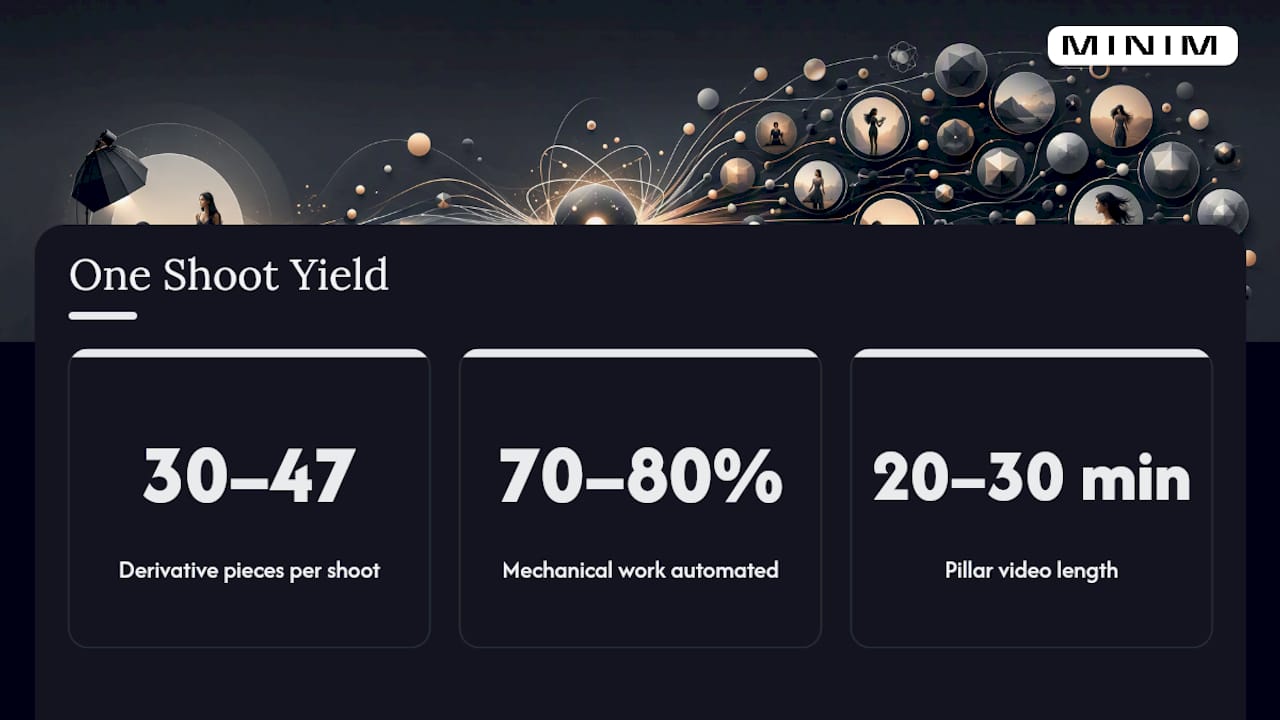
The bigger shift is cost per asset. AI tools now automate an estimated 70 to 80 percent of the mechanical work in a repurposing pipeline: transcription, rough clip detection, and format-aware resizing. Tasks that used to take an editor a full day now take a few hours, with the remaining time spent on judgment calls a machine can't make.
Pro Tip: Don't measure success by clip count alone. Track retention curves and view velocity on each atom for the first 48 hours; those two numbers tell you faster than any vanity metric which segments deserve a second life as a paid ad or a longer follow-up video.
Click-through rate to a full asset, engagement rate, and completion rate round out the scorecard. Together they tell you not just what got views, but what earned attention worth building on.
The Step-By-Step Atomization Workflow
Most teams treat atomization as an afterthought, cutting clips from a video that was never structured to be cut. Flip that order and the entire process gets faster and the output gets stronger.
- Plan the pillar with extraction points built in. Script or outline the video in modular segments, each with a clear beginning and end, so a story or tip can stand alone without context from the rest of the video. This single habit is the highest-leverage step in the entire pipeline because it removes the guesswork later.
- Transcribe the full recording and mark candidate atoms. A clean transcript makes the video searchable and lets you flag quotes, tips, and stories by timestamp in minutes rather than scrubbing through footage manually.
- Filter candidates through performance data, not gut feeling. If the pillar already has some watch data, or if it's a follow-up to a past video, use retention and view velocity to prioritize the segments that reliably hold attention over ones that just sound good on paper.
- Produce platform-specific variants, not one clip resized five ways. A 9:16 crop with bold captions for TikTok is a different edit than a 16:9 LinkedIn cutdown with a text-forward hook. Reframing without rethinking the pacing is the most common reason atomized clips underperform.
- Schedule on a staggered cadence and let early data steer the rest. Publish a handful of clips, watch the first 48 to 72 hours, then adjust captions, thumbnails, or posting order for the next batch based on what actually moved.
AI-powered clipping tools can generate 10 to 20 clip candidates in minutes, but a human still needs to pick which 10 to 15 are worth polishing and publishing. Skip that curation step and you end up flooding your channels with mediocre content instead of a tight run of strong ones.
Packaging Clips Correctly for Each Platform
The same 45-second story can flop on one platform and take off on another purely because the format doesn't match the audience's habits. Aspect ratio, length, and hook style all need to shift.
- TikTok: vertical 9:16, ideally 15 to 34 seconds, hook in the first 2 seconds with motion, a bold on-screen number, or a direct question. Captions should be punchy fragments, not full sentences.
- Instagram Reels: 9:16, similar length to TikTok but slightly more polished pacing and tone; leans better toward aesthetic or lifestyle framing than raw commentary.
- YouTube Shorts: 9:16, up to 60 seconds, rewards a clear payoff by the end since the audience skews toward people who came from long-form YouTube already.
- LinkedIn: 1:1 or 16:9, 30 to 90 seconds, open with a data point or contrarian statement rather than a visual hook. Professionals scroll slower and read captions before they hit play.
- YouTube (standalone upload): 16:9, can run longer than other channels, works well as a "highlight reel" that funnels viewers back to the full pillar video.
Overlay text matters more than most teams admit. On mute-first platforms, a viewer decides whether to keep watching within the first three seconds based almost entirely on the caption and the first visual, not the audio.
Tools That Cut Editing Time Without Cutting Editorial Judgment
The atomization pipeline breaks into five tool categories, and knowing what each one is actually good for keeps you from either over-automating or wasting hours on manual work a machine handles fine.
- Transcription tools convert raw audio to searchable, timestamped text, the foundation for everything downstream.
- Smart clip detection tools scan the transcript and audio for spikes in energy, pauses, or keyword density to suggest candidate segments.
- Reframing tools convert a 16:9 source into 9:16 or 1:1 crops while tracking the speaker's face so nothing gets cut off.
- Captioning tools auto-generate styled, synced captions matched to each platform's typical look.
- Scheduling tools batch-queue the finished clips across a staggered calendar instead of posting everything the day it's exported.
A workable pipeline runs like this: AI handles extraction and rough cuts, a human curator picks the strongest 10 to 15 candidates, and an editor polishes pacing, adds branded captions, and exports in the right formats. When comparing tools, prioritize accurate transcription, direct export to the aspect ratios you actually need, and integration with whatever media asset management system you use to store and tag the growing clip library.
When to Post Each Clip and What to Watch
Publishing all 20 clips from a single shoot in one week burns through your best material with no chance to learn from early performance. Practitioners generally stagger distribution over four to six weeks, which gives each clip room to breathe and lets you adjust captions or posting times for the next round based on what the first round taught you.
Four metrics matter more than the rest:
- Retention (how far into the clip people watch before dropping off)
- View velocity (how fast the clip gains views in the first hours after posting)
- Engagement rate (comments, shares, and saves relative to views)
- Click-through rate to the full pillar video or landing page, if that is the clip's goal
Watching first 24 to 72 hour signals on each batch is how a single filming session becomes an ongoing feedback loop instead of a one-time content dump. If clip three of week two suddenly outperforms everything before it, that's your cue to pull a similar segment for week three rather than sticking to a rigid original plan.
Where Atomization Goes Wrong and How to Catch It Before Publishing
Most atomization failures aren't about the editing. They're about sequencing and details that get skipped under deadline pressure.
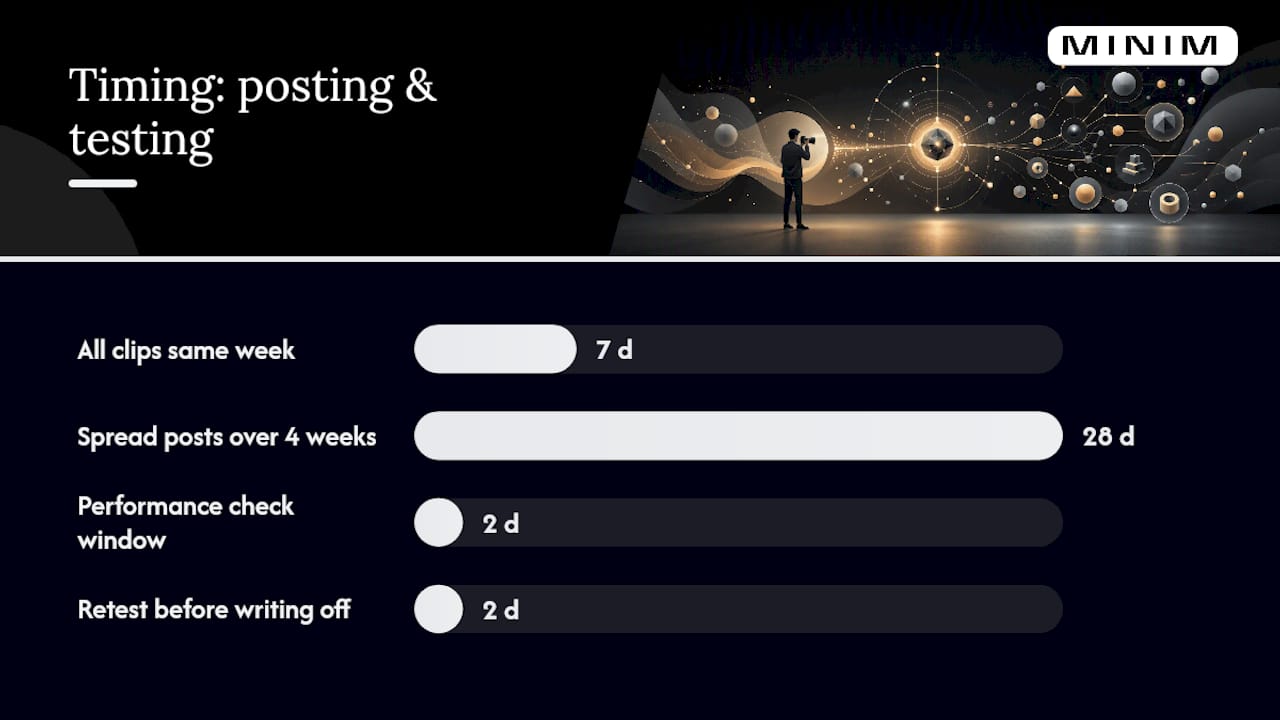
The three most common mistakes: dumping every clip within days of the shoot instead of staggering them, reusing the identical caption across five clips so the feed looks repetitive, and skipping the transcript step entirely, which makes it slower to find quotable moments and kills your text-derivative options.
Run this checklist before anything goes live:
- Captions are accurate and platform-styled, not just auto-generated and left unedited
- Aspect ratio matches the platform, not a generic resize
- Each clip has a clear call to action, even if it's just "watch the full video"
- Alt text and tags are filled in for analytics tracking
- Clip is tagged in your asset system so you can pull performance data later
| Mistake | Quick Fix |
|---|---|
| All clips posted same week | Rebuild calendar, spread over 4 weeks |
| Identical captions across clips | Write one unique hook line per clip |
| No transcript before editing | Transcribe first, mark atoms by timestamp |
| Clip underperforming after 48 hours | Swap thumbnail or caption, re-test hook |
If a clip stalls in its first two days, don't assume the content failed. Test a new caption or opening frame before writing it off entirely.
How MINIM Runs Atomization for Agency Clients
Agencies come to MINIM when they need pillar content built to survive the atomization process, not just a video that looks good once. The approach starts before the camera rolls: scripts are structured in modular segments with extraction points marked in advance, so the editing pipeline delivers clip batches instead of a single finished cut.
- Pillar videos are planned with platform deliverables in mind from the first creative brief
- Clip batches are curated, not dumped, with platform-specific variants for each channel
- Integration happens directly with your in-house creative team rather than replacing it
That structure lets agencies scale output without adding headcount, which matters most when a client wants weekly content but only has budget for one shoot.
What Actually Matters When You Atomize at Scale
Most teams treat volume as the goal, cranking out 20 clips because a tool made it easy. The tool isn't the bottleneck. Judgment is. Pick the two or three segments with real retention data behind them and cut those properly rather than mass-producing mediocre versions of everything.
Cadence discipline beats clever editing almost every time. A team that posts consistently for six weeks off one shoot will outperform a team that posts brilliantly for three days and then goes quiet.
Bring in a production partner once the atomization backlog starts costing you more in internal hours than it would to outsource the heavier lifts. Keep it internal when your volume is low enough that one person can manage the pipeline without it becoming their entire job.
— Steven Reina
Get Agency-Grade Pillar Video Without Adding to Headcount
MINIM provides production services for cinematic pillar content designed to be atomized from the start. Rather than handing you a raw video file and leaving the clip strategy to your internal team, MINIM plans the shoot around extraction points, produces the full campaign, and delivers platform-ready packages your team can schedule immediately.

That includes creative strategy, campaign development, and full production, all integrated directly with your existing creative team rather than replacing it. Their services are suited for teams aiming to scale content output without increasing internal headcount, producing deliverables suitable for various platforms and lengths. Browse past campaigns and clip packages to see how the pipeline plays out in practice, then reach out to scope your next production and get a plan built around your next shoot.
Sources
A few sources go deeper on specific pieces of this workflow if you want to build out your own playbook further. Aprimo's guide frames the definition and the analytics-led selection approach well. Clipspeed's repurposing breakdown shows the math behind turning one video into dozens of pieces. For a day-by-day posting structure, The Synchro's atomization framework maps out a full week of derivative content from a single shoot. And for format specs when packaging sponsored or branded video, Hypeworks' preflight checklist is a useful reference before export.
- What Is Content Atomization? A Marketer's Guide
- Content Repurposing: Turn 1 Video Into 30 Pieces of Content
- Video Content Repurposing: The AI-Powered Playbook | Lychee
- Content atomization: the underutilized hero of content marketing best practices
FAQ
What Is Content Atomization?
Content atomization is the practice of breaking one long-form piece of content, usually a video, into many smaller, channel-specific assets like clips, quote graphics, and text posts. The goal is transforming a single content investment into dozens of targeted assets rather than posting the same clip everywhere unchanged.
What Should the Content of a Pillar Video Include?
A strong pillar video includes distinct topic segments, at least one quotable or data-driven moment, and clear breaks where a story or tip could stand alone. Videos running 20 to 45 minutes with these natural breaks tend to produce the most usable atoms.
What Are the Main Types of Content You Can Pull From One Video?
The core outputs are short vertical clips, quote graphics, audiograms, blog posts built from the transcript, and text threads pulled from key statements. A single well-planned pillar video can realistically generate 30 or more derivative pieces across these formats.
What Kind of Video Clips Attract the Most Viewers?
Clips that open with a strong hook in the first two to three seconds, whether that's a bold number, a provocative line, or sudden motion, tend to hold attention longest. Retention and view velocity in the first 48 hours are the clearest signals of which clips are actually resonating rather than just getting served by an algorithm.
Does MINIM Handle Video Atomization for Agencies?
MINIM plans pillar videos with modular segments built in from the script stage, then delivers curated, platform-ready clip batches as part of its full production services. Pricing depends on project scope and is available by contacting the team directly rather than published as a flat rate.