
For most agency-grade campaign work, a managed production partner delivers more predictable quality and fewer logistical surprises than a self-assembled DIY stack. That said, the right route depends on your project size, internal technical capacity, and how much post-production overhead you can absorb.
Managed partner route: A single vendor handles kit, logistics, remote monitoring, and editorial handoff. You get standardized gear, a dedicated technical director, and a clear chain of accountability from brief to delivery.
DIY/plug-and-play route: Your team assembles and ships hardware kits, selects cloud software, and manages talent prep internally. Lower per-project cost at small scale, but the coordination burden grows fast across multiple locations.
Managed partner — pros:
- Consistent, agency-grade output with one point of contact
- Reduced revision rounds because QC happens before footage reaches your editors
- Scales to multi-location shoots without proportional overhead
Managed partner — cons:
- Higher per-project cost than a self-run kit
- Less direct control over gear selection and scheduling
- Requires a clear brief upfront; scope changes cost more
DIY/plug-and-play — pros:
- Lower cost for simple, single-location interviews or social clips
- Full control over platform and workflow choices
- Builds in-house capability over time
DIY/plug-and-play — cons:
- Talent becomes the on-site technical operator, which introduces risk
- Inconsistent kits across contributors create color and audio correction overhead
- Cloud storage, review tools, and proxy workflows must be configured and maintained separately
Key Takeaways
Managed remote production consistently outperforms DIY on multi-location agency projects when you account for post-production overruns, revision rounds, and the coordination overhead of self-assembled infrastructure.
| Point | Details |
|---|---|
| Pick your route first | Managed partner suits multi-location campaigns; DIY works for simple single-location social content. |
| Standardize the kit | Identical hardware across all contributors reduces color correction and audio normalization time in post. |
| Run a dry run | A structured dry-run sequence with device-metric monitoring catches audio, framing, and upload failures before the shoot. |
| Use cloud-native storage | Proxy workflows let editors start cutting the same day footage uploads, without waiting for terabyte transfers. |
| MINIM as managed partner | MINIM handles kit, logistics, remote monitoring, and editorial handoff under one contract for agency-grade output. |
Table of Contents
- What does remote video production mean for agencies?
- What hardware categories should agencies standardize on?
- Which cloud platforms and tools does a remote production stack need?
- How does a remote production workflow actually run?
- Practical prep checklist for talent at remote locations
- How do you run a dry run and QC check before recording?
- What do remote productions typically cost and how long do they take?
- How do you choose between a managed partner, DIY, and hybrid?
- How a managed partner executes remote production at scale
- How do you protect data and footage in a remote video workflow?
- What training does an in-house remote production team actually need?
- Managed partner vs. DIY: what the outcomes actually look like
- The part of remote production most agencies get wrong
- MINIM handles the system, not just the shoot
- Sources
What does remote video production mean for agencies?
Remote video production covers any workflow where the director, producer, or technical team operates from a different location than the camera and talent. For agencies, that typically means one of three scenarios: a client-side subject records from their office or home using a shipped kit, a distributed shoot runs across multiple cities simultaneously, or a live event is captured and monitored by a remote production team.
The scope is broader than most agencies initially assume. Remote production is as much about replacing the production office with centralized cloud-based coordination and approval protocols as it is about camera or microphone choices.
Use cases where remote is the right call:
Live events and conference capture. A brand hosts a two-day summit in three cities. Shipping identical PTZ camera kits to each venue and running a centralized switching session from headquarters costs a fraction of flying a full crew to each location. The output is broadcast-ready.
Distributed executive interviews. A financial services client needs six C-suite interviews across four time zones in ten days. A managed kit ships to each executive's office. A remote director handles framing and pacing via a monitor feed. Post receives consistent, color-matched files.
Influencer and creator capture. A consumer brand needs authentic footage from fifteen creators in a single week. Standardized kits with locked camera settings ship to each creator. No on-site crew, no scheduling conflicts, no mismatched color profiles.
Quick-turn social ads. A 48-hour turnaround on a product spot. A remote recording platform captures the talent session locally and uploads immediately after. Editors receive proxies within the hour.
When remote is the wrong call:
Skip fully remote for final cinematic color grade sessions that require a calibrated monitor in the room, or for complex VFX shoots where on-set supervision of lighting and tracking markers is non-negotiable. Remote works when the capture environment can be controlled in advance. When it cannot, a hybrid or fully crewed approach is the safer bet.
What hardware categories should agencies standardize on?
The hardware decision comes down to three questions: How much control does the remote director need over framing? How technically capable is the person on-site? And how consistent does the output need to be across contributors?
PTZ cameras
PTZ (pan-tilt-zoom) cameras are the workhorse of remote shoots without a local operator. A remote technical director can adjust framing, zoom, and focus from anywhere with a network connection. PTZOptics is a widely referenced manufacturer in broadcast and corporate production workflows, with units that support NDI, HDMI, and USB outputs at resolutions up to 4K. The tradeoff is that PTZ optics are generally less cinematic than a fixed prime lens, so they suit interviews, panels, and events more than narrative or brand-film work.
Fixed and cinema cameras
For higher-end commercial work, fixed cameras (DSLRs, mirrorless, or cinema cameras) ship pre-configured with locked settings. The talent or a local coordinator presses record; the remote director monitors via a feed. Output quality is higher, but framing adjustments require someone on-site.
Webcams and mobile capture
High-quality webcams (Logitech Brio 4K, for example) and smartphone rigs work for quick-turn social content where broadcast specs are not required. They reduce shipping cost and setup complexity, but color consistency across contributors is harder to control.
Audio, lighting, and support
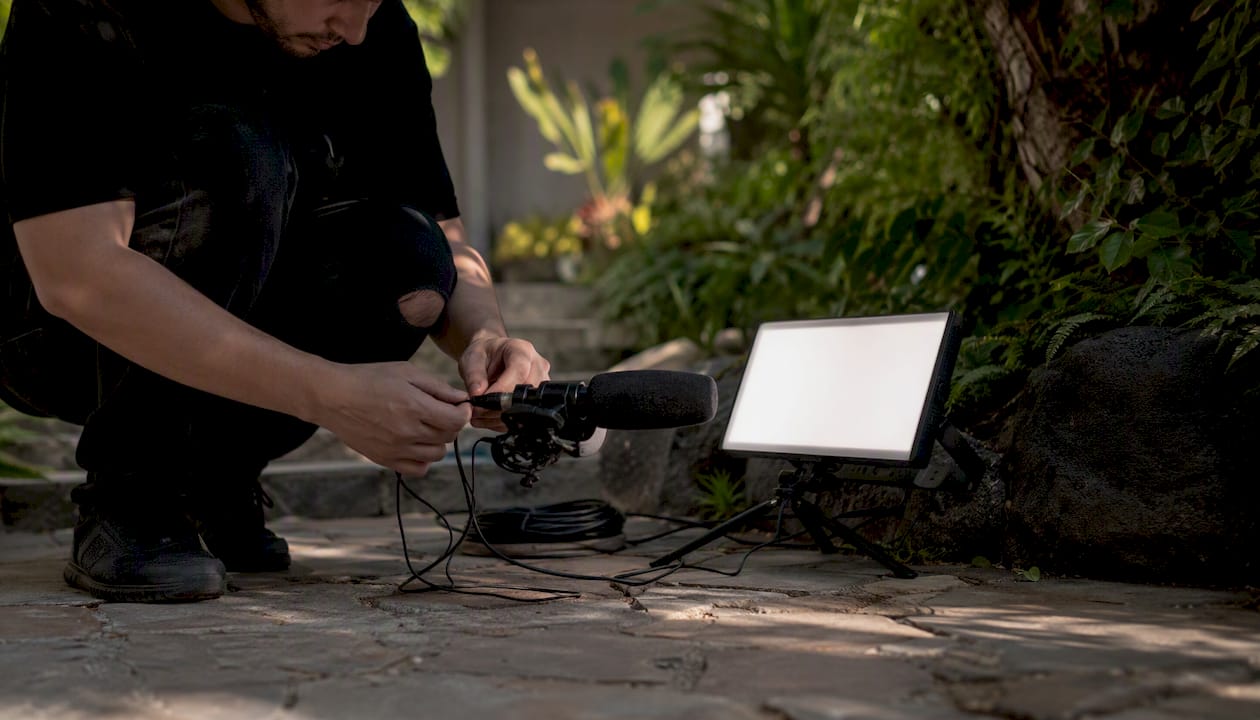
A standard shipped kit should include a directional or lavalier microphone, a two-point LED lighting setup with diffusion, a compact tripod or desktop mount, and labeled cabling. Turnkey kits that bundle camera, lights, and sound in a single case let non-technical talent plug in and record while production staff operate the session remotely. Crew in a Box is a recognized example of this all-in-one approach, designed specifically for non-technical hosts.
Specs agencies must standardize
| Spec | Minimum standard | Notes |
|---|---|---|
| Resolution | 4K | 4K preferred for reframing in post |
| Codec | Common codecs | ProRes or RAW for high-end work |
| Color space | Standard color profiles | Log requires LUT pipeline in post |
| Frame rate | 23.98 or 25fps | Match across all contributors |
| Audio channels | Dual-channel, 48kHz/24-bit | Separate lav and room mic tracks |
| Network interface | Ethernet preferred, WiFi backup | Minimum 10 Mbps upload per camera |
| Bitrate | 50 Mbps minimum | Higher for motion-heavy content |
Shipping kits vs. local rental: Shipping identical kits is almost always worth the freight cost. When every contributor uses the same camera body, lens, and microphone with the same locked settings, color correction and audio normalization time in post drops significantly. Local rental introduces gear variability that your colorist and audio engineer will spend hours correcting.
Which cloud platforms and tools does a remote production stack need?
The software layer is where most DIY remote workflows break down. Teams pick a recording tool, forget about proxy workflows, and end up with editors waiting two days for raw files to transfer. A production-grade cloud stack has five distinct layers, and each one needs to be chosen deliberately.
Remote recording and live switching
Platforms like Riverside record locally on each participant's device and upload after the session, which means a dropped connection mid-interview does not destroy the take. That local-record-then-upload behavior is the single most important feature to verify before committing to a recording platform. For live events with multiple camera angles, a cloud-based switching tool or a hardware switcher with a remote operator handles the cut.
Cloud-native media storage
Consumer sync services (Dropbox, Google Drive) throttle large media workflows. Cloud-native storage built for video lets editors stream footage on demand, avoiding terabyte transfers and keeping distributed teams productive without waiting for downloads. Look for platforms that support proxy generation on ingest, permission-based folder access, and direct NLE integration.
For agencies managing multiple concurrent projects, a purpose-built media asset management platform adds version control, metadata tagging, and client-facing delivery portals on top of raw storage.
Review and approval
Frame-accurate comment tools convert multi-day review cycles into same-day fixes. When a reviewer pins a note to a specific timecode, the editor knows exactly what to address without a back-and-forth email chain. Look for tools that support approval gates (a formal sign-off before the project moves to the next stage) and that log revision history.
Project and production management
A production management platform ties shoot schedules, task assignments, asset links, and approval status into one view. Without it, producers track status across Slack threads, email, and spreadsheets, and things fall through.
The camera-to-cloud workflow in practice
Raw files ingest to cloud storage on upload. The platform generates proxies automatically. Editors pull proxies into their NLE and cut. Reviewers leave timecode-linked comments. Editors address notes and relink to the original high-resolution files for export. Structured workflows with clear review stages reduce revision rounds and speed delivery compared with unstructured teams where feedback arrives in mixed formats.
How does a remote production workflow actually run?
The workflow breaks into three phases. Pre-production is where most of the risk management happens. Day-of is execution. Post is where the cloud stack either pays off or becomes a bottleneck.
Pre-production (1–3 weeks before shoot):
- Creative brief locked and approved
- Virtual recce: remote director reviews location via video call, checks background, lighting conditions, and internet speed
- Kit selected, configured, and shipped with labeled instructions
- Camera and audio settings locked and documented
- Dry run scheduled (see Section 7)
- Handoff document prepared with naming conventions, folder structure, and upload instructions
Day-of:
- Local coordinator or talent sets up kit per prep doc
- Remote technical director connects and verifies feeds
- Smoke test and burn-in clip recorded and reviewed
- Session recorded; local files backed up to a secondary drive
- Files uploaded to cloud storage immediately after wrap
Post (1–5 days after shoot):
- Proxies generated on ingest
- Editor pulls proxies and begins assembly cut
- Review link sent; frame-accurate comments collected
- Revisions addressed; final relink to high-resolution files
- Export and delivery
Pro Tip: Before shipping any kit, lock every camera setting (codec, shutter angle, white balance, frame rate, and audio gain) and document them in a one-page PDF that ships inside the case. A virtual recce should confirm the location's ambient light and internet speed at least five days before the shoot date, leaving time to send supplemental lighting or a cellular backup device if needed.
Role map for a remote production
| Role | Location | Responsibilities |
|---|---|---|
| Producer | Remote | Brief, scheduling, budget, client comms |
| Director | Remote | Creative direction, talent coaching via monitor feed |
| Remote technical director | Remote | Camera control, switching, monitoring feeds |
| On-site talent / subject | Location | Delivery, kit setup with guidance |
| Local coordinator | Location | Kit setup, cable management, backup recording |
| DIT / media ingest | Remote or local | File verification, upload, proxy check |
Centralized, cloud-based coordination enables follow-the-sun handoffs: a DIT in Los Angeles verifies uploads at end of day, and an editor in New York begins the assembly cut the same evening. That overlap eliminates the overnight wait that adds a full day to traditional workflows.
Practical prep checklist for talent at remote locations
The biggest operational risk in remote production is that the talent becomes the on-site technical operator. A clear, one-page prep document and a short pre-shoot video reduce onboarding time for non-technical subjects and prevent the most common failures.
Framing and environment:
- Camera at eye level, lens approximately arm's length from face
- Eyes in the upper third of the frame
- Background clean, uncluttered, and at least three feet behind the subject
- No windows directly behind the subject (side windows are fine with a blind or curtain)
- Room sound: close doors, hang a blanket on hard walls if the room is echoey
Lighting:
- Key light (main LED panel) at 45 degrees to the face, slightly above eye level
- Fill light or reflector on the opposite side to reduce harsh shadows
- No overhead fluorescent lights as the sole source
Audio:
- Lavalier clipped to the center of the chest, under a layer of clothing if possible to reduce rustle
- Headphones in during the dry run to confirm no feedback or hum
- Room fan and HVAC off during recording
Camera settings to lock before shipping:
- Codec: Common codecs at 50 Mbps minimum
- Shutter angle: 180 degrees (double the frame rate)
- White balance: manual, set to match the LED panel's color temperature
- Frame rate: 23.98 or 25fps per project spec
- Audio: 48kHz / 24-bit, dual channel
Network and power:
- Ethernet connection preferred; minimum 10 Mbps upload confirmed before shoot day
- Laptop or camera plugged into wall power, not running on battery
- A cellular hotspot as backup if the location's internet is unreliable
Kit packaging: Label every cable and component with a numbered sticker that matches a diagram in the prep doc. Include a return shipping label inside the case. A video creative brief sent alongside the kit prep doc gives talent context for the project and reduces the number of questions on shoot day.
Pro Tip: Record a two-minute setup video showing exactly how to connect the kit, position the light, and clip the microphone. Send it the day the kit arrives. Talent who watch a video make fewer mistakes than talent who read instructions.
How do you run a dry run and QC check before recording?
A dry run is not optional. It is the single session that separates productions that deliver on time from ones that spend the first hour of shoot day troubleshooting a hum in the audio feed.
Step-by-step dry run sequence:
- Connect and verify: Remote technical director joins the call. Confirm all camera feeds are visible and audio channels are active.
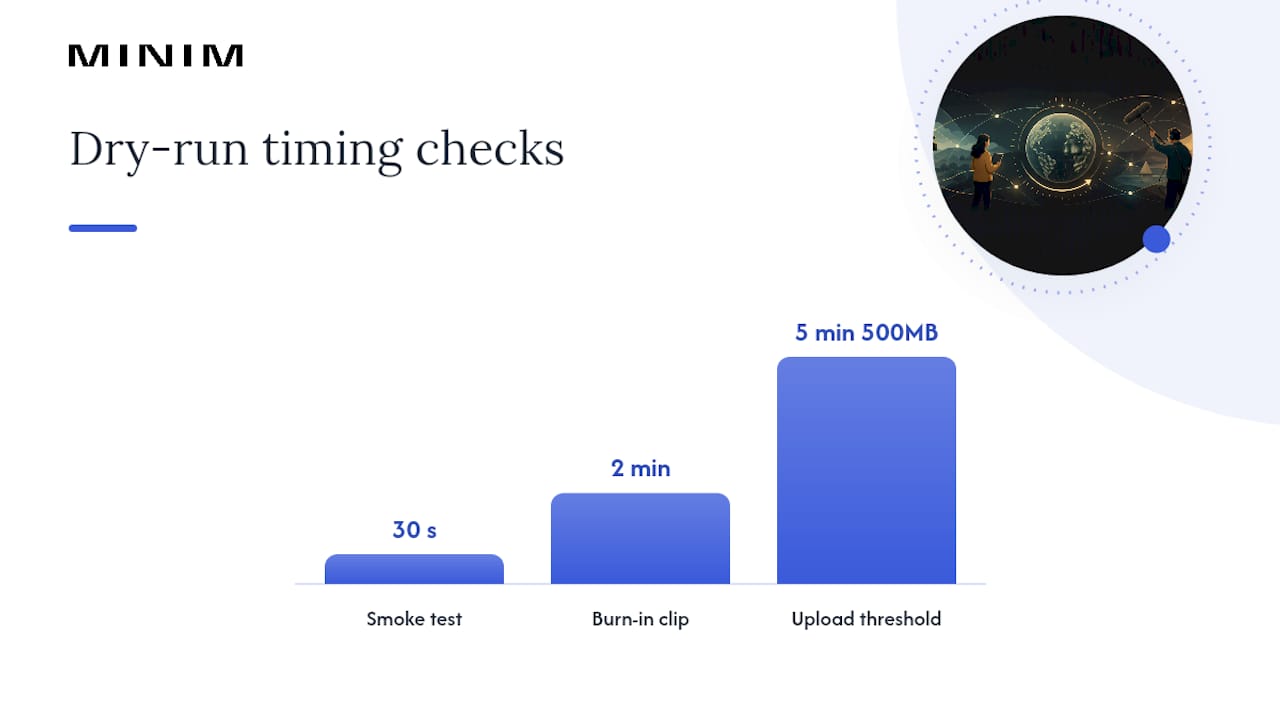
- Smoke test: Record a 30-second clip. Play it back immediately. Check framing, exposure, white balance, and audio levels.
- Burn-in clip: Record a two-minute clip with the talent speaking naturally. Upload it to the cloud storage folder. Verify the proxy generates correctly and the file metadata (timecode, frame rate, codec) matches the project spec.
- Upload speed test: Time the upload of the burn-in clip. If it takes more than five minutes for a 500 MB file, flag the connection and consider a cellular backup.
- Go/no-go decision: If all checks pass, confirm the shoot. If audio or video fails, troubleshoot before the scheduled record time.
Monitoring device-level metrics during the dry run, including WiFi signal strength, CPU usage, and latency, helps predict session instability before it becomes a dropped frame or a corrupted file. A remote technical director watching these metrics can catch a struggling device before the talent even notices a problem.
QC checklist (post-shoot, before editorial handoff):
- Picture: correct exposure, no clipping, consistent white balance across all contributors
- Audio: levels peaking at -12 to -6 dBFS, no hum, no clipping, dual channels confirmed
- Metadata: timecode continuous, frame rate consistent, codec matches spec
- File packaging: naming convention applied, folder structure correct, backup copy confirmed
- Proxy: generated and linked correctly in the NLE project
Troubleshooting decision tree:
Internet drop mid-session: Switch to cellular backup. If backup unavailable, pause and reschedule. Do not attempt to continue on an unstable connection; the local recording will be intact.
Audio hum: Check for a ground loop (unplug the laptop charger during recording). If the hum persists, switch to the backup microphone.
Frame drops or stuttering feed: Check CPU load on the talent's device. Close background applications. If the issue continues, lower the streaming resolution while keeping the local record at full quality.
What do remote productions typically cost and how long do they take?
Budget and timeline vary more in remote production than in traditional shoots, because the cost of kit logistics, cloud infrastructure, and remote monitoring adds variables that don't exist in a single-location studio shoot.
Small project (single interview or social clip):
- Typical budget: $2,000–$8,000 depending on kit quality and post complexity
- Timeline: 48–72 hours from brief to delivery for quick-turn; 1–2 weeks for a polished cut
- Includes: kit shipping, one remote session, basic color and audio, one round of revisions
Medium project (multi-location short-form campaign, 3–6 contributors):
- Typical budget: $15,000–$40,000
- Timeline: 2–6 weeks including pre-production, shoot days, and post
- Includes: standardized kit shipping to all locations, remote technical direction, cloud storage, proxy workflow, two rounds of revisions
Large project (multi-day shoots with live switching and remote monitoring):
- Typical budget: $50,000 and above
- Timeline: 6+ weeks
- Includes: full managed kit logistics, dedicated remote technical director, live event switching, DIT services, full post-production pipeline
Factors that move a project up a budget band:
- Each additional location adds kit shipping, a local coordinator, and a separate upload pipeline
- Live switching requires a dedicated operator and a hardware or cloud switcher
- Bespoke gear (cinema cameras, wireless follow focus) increases kit cost and setup complexity
- Rush delivery (under 48 hours) typically adds a premium of 25–40% to post costs
SOW checklist for remote productions:
- Deliverables: formats, resolutions, aspect ratios, and quantity
- Rights: usage territory, duration, and exclusivity
- Ingest and archival: who stores the raw files and for how long
- Support windows: hours during which the remote technical director is available
- Cancellation and contingency: what happens if a location's internet fails on shoot day
How do you choose between a managed partner, DIY, and hybrid?
The decision comes down to four variables: output quality requirements, internal technical capacity, project complexity, and how much coordination overhead your team can absorb.
| Option | Best for | Budget range | Setup complexity | Support level | Scalability | Cloud features | Quality tradeoffs |
|---|---|---|---|---|---|---|---|
| Managed partner | Multi-location campaigns, agency-grade output | Medium–high | Low (partner handles) | Fully managed | High | Full pipeline included | Highest consistency |
| DIY/plug-and-play | Single-location interviews, social content | Low–medium | High (team configures) | Self-serve | Limited | Team selects tools | Variable; depends on team skill |
| Hybrid | Agencies with some in-house tech capacity | Medium | Medium | Partial (agency supplies creative, partner supplies kit) | Moderate | Shared responsibility | Good with clear handoffs |
Questions to ask a managed partner before signing:
- What is your SLA for kit delivery and replacement if a unit fails?
- Do you carry production insurance that covers equipment and liability at remote locations?
- How do you handle data security for raw footage in transit and in cloud storage?
- What is your remote monitoring setup and who is the point of contact during the shoot?
- Can you provide references from projects of similar scale and complexity?
Red flags that a vendor or kit is not ready for agency-grade delivery:
- No documented dry-run protocol
- Kit components sourced from multiple manufacturers with no standardization
- Cloud storage is a consumer sync service
- No frame-accurate review tool in the workflow
- No clear escalation path if a shoot-day technical failure occurs
When outsourcing video production, the hybrid model works well for agencies that have a strong creative director and producer but lack the technical infrastructure for multi-location capture. The agency owns the brief and the edit; the partner owns the kit, logistics, and remote monitoring.
How a managed partner executes remote production at scale
A mid-size consumer brand agency needed six product campaign videos across four U.S. cities in three weeks. The brief called for consistent visual language, 4K delivery, and a two-week post-production window. The agency had the creative direction covered but no internal remote production infrastructure.
The managed partner approach worked like this: a single production brief went to one point of contact. Identical kits shipped to all four locations five days before the first shoot date. A virtual recce confirmed lighting conditions and internet speeds at each location. Camera settings were locked and documented. A remote technical director monitored all four feeds on shoot days, flagging a failing WiFi connection at the Chicago location before recording began and switching to a cellular backup.
All raw files uploaded to a shared cloud storage folder within two hours of each shoot wrapping. Proxies generated automatically. The agency's editors began assembly cuts the same evening. Standardizing hardware across all contributors meant the colorist spent less than a day matching the six locations rather than the three days a mixed-kit approach would have required.
Two rounds of frame-accurate review, with timecode-linked comments, resolved all client feedback without a single ambiguous note. Final delivery landed two days ahead of the contracted date.
The operational benefit of a single supplier for kit, logistics, monitoring, and editorial handoff is that accountability never diffuses. When something goes wrong (and something always does), there is one call to make.
How do you protect data and footage in a remote video workflow?
Raw footage is a client asset. Treating it like one from the moment of capture is not optional for agency-grade work.
In transit: All files moving from a talent's device to cloud storage should travel over an encrypted connection (TLS 1.2 or higher). Avoid public WiFi for uploads; a cellular hotspot is a safer upload path than a hotel or conference center network.
In storage: Cloud storage platforms should offer AES-256 encryption at rest, role-based access controls, and audit logs showing who accessed which files and when. Folder permissions should be set so that talent and local coordinators can upload but cannot browse other projects.
Contractual: Your SOW with a managed partner should specify who owns the raw files, how long the partner retains them, and under what conditions they are deleted. For regulated industries (healthcare, finance), confirm that the storage platform meets relevant compliance standards (SOC 2 Type II is a reasonable baseline for most agency work).
On-device: Brief talent to delete local copies once upload is confirmed and verified. A simple confirmation email from the DIT ("files received and verified — safe to delete local copy") closes the loop cleanly.
What training does an in-house remote production team actually need?
Building an in-house remote production capability is a 3–6 month project, not a weekend setup. The gap most agencies underestimate is not the hardware; it is the operational knowledge to run a consistent workflow across people who have never done it before.
Core training areas:
Technical operation: Camera settings, audio monitoring, basic lighting ratios, and network troubleshooting. A one-day workshop with hands-on kit setup covers the fundamentals. Follow it with a supervised dry run on a low-stakes internal project before going live with a client.
Cloud workflow: Ingest procedures, naming conventions, proxy workflows, and review tool protocols. This is where most teams develop bad habits early. A written SOP (standard operating procedure) document, reviewed and updated after every project, is more valuable than any training session.
Remote direction: Coaching talent via a monitor feed is a different skill than directing in person. Tone, pacing, and the ability to give clear, calm instructions to a non-technical subject under time pressure are learned through repetition.
Ongoing support: Designate one person as the remote production lead. That person owns the kit inventory, the SOP document, and the post-project debrief. Without a single owner, standards drift after the third or fourth project.
For agencies that run remote productions fewer than six times a year, the training and maintenance overhead of an in-house capability often exceeds the cost of a managed partner. The math shifts when volume is consistent and the project type is repeatable.
Managed partner vs. DIY: what the outcomes actually look like
Two comparable agency scenarios illustrate the difference clearly.
Scenario A (DIY): A brand team assembled its own kit using a mix of purchased and rented cameras, a consumer cloud storage account, and a general-purpose video call platform for remote direction. The three-location shoot produced footage with two different color profiles, an audio hum on one feed that wasn't caught until post, and a 36-hour delay waiting for raw files to transfer. The post-production budget overran by roughly 30% on color correction and audio cleanup alone.
Scenario B (managed partner): The same project scope, handled by a managed partner with standardized kits, a cloud-native storage pipeline, and a dedicated remote technical director. The audio hum was caught and resolved during the dry run. Files were in the editor's hands within two hours of the final shoot wrapping. Post came in on budget.
The difference is not the camera. It is the system around the camera: the standardized kit, the documented workflow, the person watching the metrics during the session, and the cloud infrastructure that moves files without manual intervention.
For agencies producing more than a handful of remote projects per year, the managed partner model consistently delivers a lower total cost of production when you account for post-production overruns, revision rounds, and the producer time spent troubleshooting DIY infrastructure.
The part of remote production most agencies get wrong
The conventional wisdom says remote video production is a hardware problem. Buy the right camera, ship it to the right person, and you get broadcast-quality footage. That framing is wrong, and it leads agencies to underinvest in the parts of the workflow that actually determine whether a project delivers on time and on budget.
The real leverage point is the system around the camera: the dry-run protocol, the naming conventions, the proxy pipeline, the frame-accurate review tool, and the person watching device metrics during the session. A $3,000 PTZ camera connected to a consumer Dropbox account and reviewed via email will produce worse outcomes than a mid-range fixed camera connected to a cloud-native storage platform with a structured approval workflow.
The second thing agencies consistently underestimate is the talent-as-operator problem. When a non-technical subject is the only person in the room, every ambiguity in the prep doc becomes a potential failure point on shoot day. The agencies that run remote production well treat the pre-shoot prep as seriously as the shoot itself. They send kits early, run virtual recces, record prep videos, and schedule dry runs with enough lead time to fix problems. The ones that treat prep as a formality spend shoot day troubleshooting.
One actionable takeaway: before your next remote project, write a one-page SOP that covers kit setup, camera settings, upload procedure, and the dry-run sequence. Run it on an internal test shoot before it goes anywhere near a client. The hour you spend writing that document will save you three hours on shoot day.
MINIM handles the system, not just the shoot
Agencies that need agency-grade remote production without building the infrastructure internally work with MINIM as a managed production partner. MINIM integrates directly with your creative team, handling kit standardization, logistics, remote technical direction, cloud ingest, and editorial handoff under one contract. No gear inventory to maintain, no cloud stack to configure, no troubleshooting calls on shoot day.

The practical difference: your producers brief the project, MINIM executes the production system. See the full range of production services or review completed campaign work to assess fit before reaching out. When you're ready to scope a project, the next step is a brief conversation about deliverables, locations, and timeline.
Sources
- Remote Video Production Workflow Guide For 2024–2026
- Remote video production: a step-by-step guide | LucidLink
- Remote Video Editing Workflow Guide for Teams (2026) | Fastio
- Video Collaboration Workflow: How Remote Teams Create Content Together | Vibbit
- Ptzoptics
- remote-dx-overview