

A motion branding system is a defined set of behavioral rules, timing tokens, and production toolkits that make a brand move consistently across every touchpoint — from a product micro-interaction to a 30-second campaign film. Think of it as the motion equivalent of a type scale: invisible when it works, glaring when it breaks.
Do you need one? Here is the honest decision rule:
- You need a motion system if more than one team produces animated content, if motion appears inside a product interface, or if you run repeatable campaigns across multiple channels.
- You can wait if your brand produces motion rarely, from a single studio, with no handoff to engineering.
- Your immediate next step: run a one-hour motion audit. Pull every animated asset produced in the last 12 months, play them side by side, and ask whether a viewer could identify them as the same brand without a logo. If the answer is no, you have a system problem, not a craft problem.
Key takeaways
A motion branding system scales only when behavioral rules, named tokens, and a living toolkit work together — without all three, consistency breaks the moment a second team touches the work.
Immediate actions:
- Run a one-hour motion audit: pull every animated asset from the last 12 months and play them side by side.
- Define two or three motion principles with behavioral rules attached, not just adjectives.
- Write a minimal token set (three durations, two or three easing curves) and store it in JSON.
- Prototype one interaction per principle in Figma or Rive before writing full documentation.
- Schedule a quarterly governance review and assign a named system owner before the system ships.
Meeting-prep lines for stakeholder alignment:
- "We need motion principles before we can write tokens — can we get brand lead, creative director, and a product designer in a room for half a day?"
- "The audit showed [X] different easing curves across our product and campaign output. A token set would reduce that to three."
- "We need to decide: build internally over four months, or engage a partner to run system-building and campaign production in parallel."
| Point | Details |
|---|---|
| Audit before building | Play all animated assets side by side; mismatched easing is the clearest signal a system is needed. |
| Principles before tokens | Two or three behavioral rules must exist before any timing value is written down. |
| Living documentation | Store the system in Notion, Zeroheight, or Storybook — never a static PDF that cannot be versioned. |
| Governance is non-optional | Assign a named system owner and a quarterly review before the system launches, not after. |
| MINIM as production partner | MINIM builds motion systems and campaign-grade output in parallel, so system architecture and production delivery happen in one engagement. |
Table of Contents
- What motion branding systems actually include
- Core components of a robust motion branding system
- How to build a motion system step by step
- How motion systems live in production: formats, tooling, and handoff
- What strong motion systems look like in practice
- What to do and what to avoid when implementing motion systems
- Production realities: in-house vs. partner, costs, and what to look for
- The part of motion systems nobody talks about
- MINIM builds motion systems that ship and stay alive
- Sources
What motion branding systems actually include
A motion branding system is not a style guide with a few GIFs attached. It is a living, governable structure that defines how a brand behaves in time, not just in space. Creative Boom's motion-first branding coverage describes it plainly: a set of rules, principles, and reusable components that define how a brand uses motion across digital products and media.
Most organizations move through four recognizable maturity levels:
| Level | What exists | What it delivers |
|---|---|---|
| 1. Animated assets | One-off files (GIFs, MP4s, AE projects) | Visual consistency within a single campaign |
| 2. Motion guidelines | A PDF or Notion doc with easing and timing rules | Faster briefing; still relies on individual craft |
| 3. Motion system | Named tokens, pattern library, governance process | Cross-team consistency; reduced rework |
| 4. Integrated motion design system | Living tokens feeding design tools and code | Scale across product, marketing, and campaign simultaneously |
When to move up a level:
- Move from Level 1 to 2 when a second team starts producing motion independently.
- Move from Level 2 to 3 when engineering needs to implement motion in a product interface.
- Move from Level 3 to 4 when motion tokens need to sync automatically between Figma and a component library.
Most brand teams underestimate how long Level 2 stays "good enough." A well-written motion guidelines document, maintained in a shared Notion or Confluence page, handles a surprising amount of scale before the overhead of a full token system pays off.
Core components of a robust motion branding system
Every durable motion system shares the same anatomy, regardless of brand size. The components below are not optional extras; each one closes a specific gap that causes inconsistency at scale.
Motion principles (personality) These are the two or three adjectives that describe how the brand moves, translated into behavioral rules. Klarna's motion guidelines use clarity, meaning, and humanity. GE HealthCare's brand motion guidance uses calm, balance, and concise. The principle names matter less than the behavioral rules they generate: "calm" becomes "no motion that starts before the user initiates it."
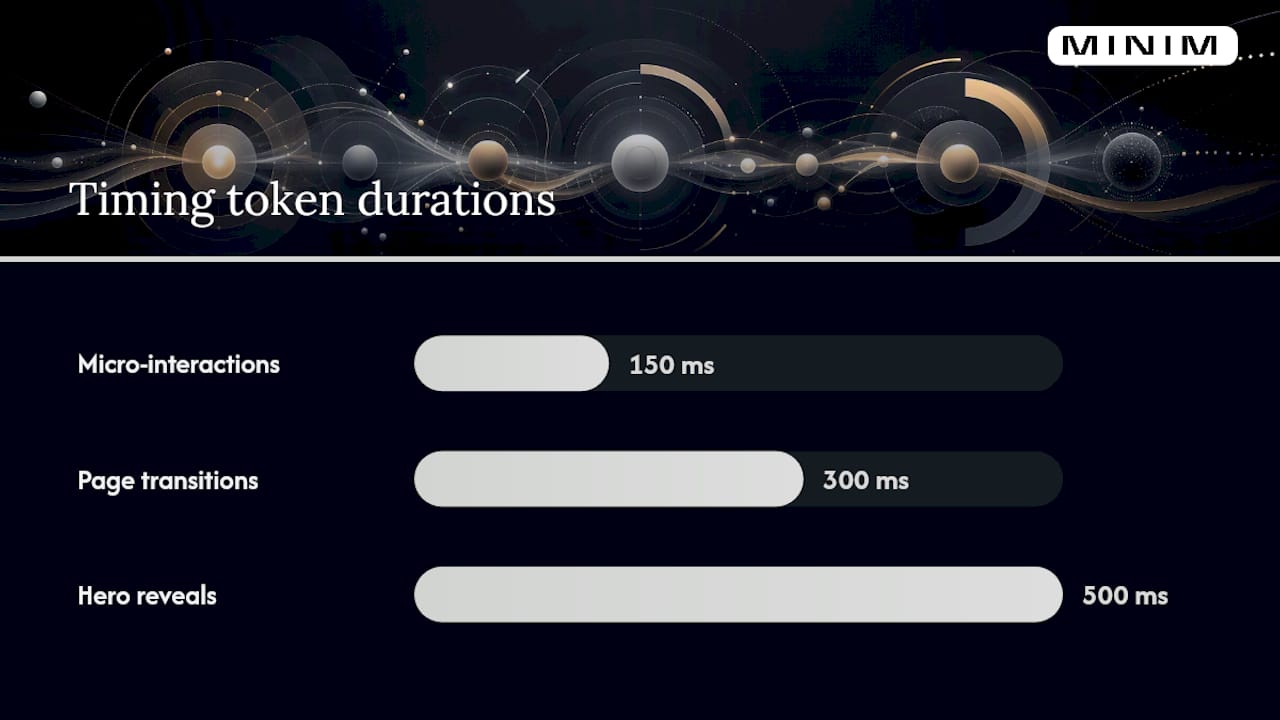
Timing and easing tokens These are the most copy-paste-ready part of any system. A minimal token set looks like this:
duration-fast: 150ms (micro-interactions, hover states)duration-standard: 300ms (page transitions, modal entry)duration-slow: 500ms (hero reveals, brand moments)easing-enter: cubic-bezier(0.0, 0.0, 0.2, 1) — decelerating, objects arrivingeasing-exit: cubic-bezier(0.4, 0.0, 1, 1) — accelerating, objects leavingeasing-standard: cubic-bezier(0.4, 0.0, 0.2, 1) — general UI transitions
Klarna's guidelines recommend Material 3 easing as a UI reference, which maps directly to the cubic-bezier values above.
Transition patterns Named, classified patterns prevent every designer from inventing their own. GitHub's Brand Toolkit classifies transitions as container transform, lateral, enter & exit, and simple ease, each tied to a specific relationship between the action and its outcome. That taxonomy is worth borrowing directly.
Micro-interactions Button states, form validation feedback, loading indicators. These are the highest-frequency motion moments in any product and the ones most likely to drift without explicit rules.
Asset and component libraries Exported Lottie or Rive files for runtime use, After Effects templates for campaign production, and Figma component variants for design-stage previewing. A library without governance is just a folder.
Documentation and governance Who approves a new motion pattern? How does an exception get logged? Without answers to those questions, the system erodes within two quarters.
Pro Tip: Document the "why" behind every rule, not just the "what." A token that says "300ms ease-out for modal entry" is useful. A token that says "300ms ease-out for modal entry — because the user initiated this action and the interface should respond without delay" is interpretable by a product manager, a front-end engineer, and a content designer who has never touched After Effects. Behavioral rationale, as Creative Boom's motion-first guide argues, is what makes rules survive handoff.
Accessibility belongs here too, not in a footnote. Every motion system needs a prefers-reduced-motion media query strategy, explicit rules for autoplay (generally: don't, unless the user expects it), and a file-size ceiling for Lottie files served on mobile (a practical ceiling is 100KB per animation).
How to build a motion system step by step
The sequence below is not theoretical. It reflects how production teams actually ship these systems without losing momentum between phases.
-
Audit existing motion. Collect every animated asset from the past 12 months. Categorize by touchpoint (product UI, social, campaign, OOH). Note timing values, easing styles, and duration ranges already in use. This surfaces the de facto system your brand already has, which is always the fastest starting point.
-
Define motion principles. Run a half-day workshop with brand lead, creative director, and a product designer. Produce two or three principle statements with behavioral rules attached. No more than three — a list of eight principles is a list of zero principles.
-
Tokenize timing and easing. Convert the principles into named tokens (see the token examples in the previous section). Store them in a format that both design tools and code can consume: JSON for design tokens, CSS custom properties for engineering.
-
Prototype one interaction per principle. Build a working prototype in Figma or Rive that demonstrates each principle in a real context. This is the proof-of-concept phase. It also surfaces conflicts between principles before they become production problems.
-
Document in a living system. A static PDF is a dead document. Use Notion, Zeroheight, or a Storybook-style catalog. Every pattern needs a name, a video preview, the token values it uses, and the behavioral rationale behind it.
-
Toolkit handoff. Package deliverables: a Figma library with motion component variants, a Lottie/Rive export gallery, a CSS/JSON token file, and a one-page governance brief. Engineering and design should be able to implement a new pattern without asking a motion designer.
-
Govern and maintain. Schedule a quarterly review. Assign one person as the motion system owner. Build a lightweight exception process: any new pattern not covered by existing tokens gets reviewed before it ships, not after.
Roles and responsibilities:
| Role | Responsibility |
|---|---|
| Brand lead | Owns motion principles; final approval on new patterns |
| Motion designer | Builds prototypes, maintains Lottie/Rive library |
| Product engineer | Implements tokens in code; flags implementation gaps |
| Accessibility reviewer | Validates reduced-motion support; checks autoplay behavior |
| Content owner | Applies motion rules in campaign production |
Timeline and cost by maturity level:
These ranges assume external production support. Internal-only builds typically take longer and cost less in cash but more in opportunity cost.
Success metrics: consistency score (percentage of reviewed assets that pass a motion audit without revision), time-to-delivery for a new animated asset, and reuse rate (percentage of new animations built from existing library components rather than from scratch).
How motion systems live in production: formats, tooling, and handoff
The toolchain is where most motion systems either scale or stall. A well-chosen stack removes the motion designer as a bottleneck; a poorly chosen one makes every new animation a bespoke project.
Design-side tooling:
- Figma with a shared motion component library and Smart Animate for in-tool previewing. Tokens stored as Figma Variables sync with JSON exports via plugins like Tokens Studio.
- After Effects remains the production standard for campaign-grade motion. It is not a system tool; it is an output tool. Keep AE templates in the library, but do not treat AE as the source of truth for tokens.
- Rive is increasingly the right choice for interactive, state-driven animations in product interfaces. Its state machine model maps naturally to UI logic in a way that Lottie does not.
Runtime formats and when to use them:
- SVG/CSS animations: best for simple, looping UI states (loading spinners, icon transitions). Zero additional file weight, fully accessible, trivially responsive.
- Lottie (JSON): best for moderate-complexity vector animations that need to run on mobile and web without video overhead. Keep files under 100KB. Avoid Lottie for animations with complex masks or raster layers — the file size balloons and performance degrades on low-end devices.
- Rive: best for interactive animations with multiple states (a button that has idle, hover, pressed, and loading states in a single file). Slightly steeper learning curve than Lottie but far more powerful for product UI.
- Video (MP4/WebM): best for cinematic campaign assets, hero backgrounds, and any animation that involves live footage or complex compositing. Not reusable at the component level; treat as a campaign deliverable, not a system component.
For a deeper look at motion graphics in commercial work, the commissioning and format decisions follow the same logic: match the format to the runtime environment, not to the designer's preferred tool.
Handoff checklist for designers:
- Export Lottie/Rive files with named layers that match the token names in the system.
- Provide a preview video alongside every Lottie file — engineers cannot play JSON in a browser without a renderer.
- Document which tokens each animation uses, so future edits propagate correctly.
- Flag any animation that requires a
prefers-reduced-motionfallback.
Handoff checklist for engineers:
- Confirm token names in the JSON file match the CSS custom property names in the codebase.
- Test Lottie files on a low-end Android device before merging — performance issues that are invisible on a MacBook Pro are obvious on a mid-range phone.
- Implement
prefers-reduced-motionat the component level, not as a global override.
Dynamic identity approaches — where algorithmic or data-driven inputs generate variable brand outputs — can plug into this toolchain at the token level. A data feed that adjusts color or timing tokens in real time produces context-sensitive motion without requiring a new animation file for every variation.
What strong motion systems look like in practice
The most instructive examples are not the flashiest. They are the ones where motion is so consistent that you stop noticing it and start trusting the brand.
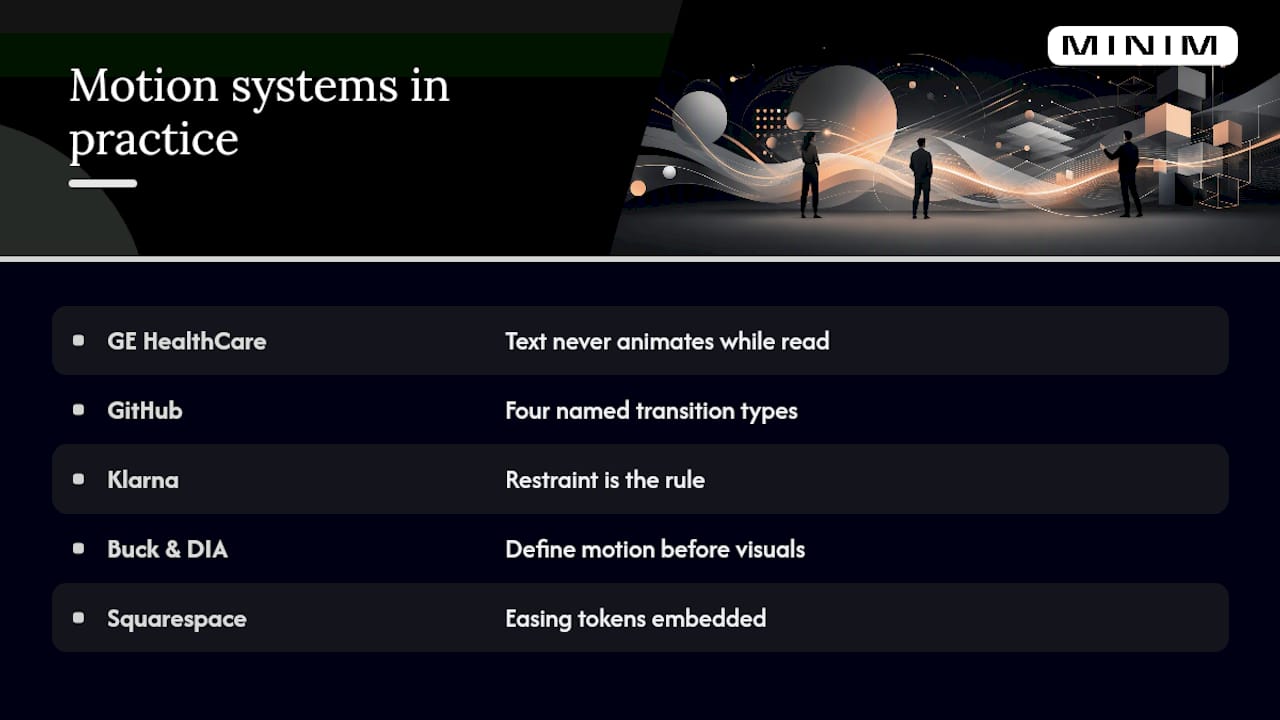
GE HealthCare GE HealthCare's motion guidance is a masterclass in restraint for a regulated industry. Three principles (calm, balance, concise) generate specific rules for typography animation, intro/outro timing, and transition behavior. The system is explicit about legibility: text never animates while it is being read. That single rule eliminates an entire category of accessibility failure. The takeaway for other enterprise brands: write rules that close specific failure modes, not rules that describe an aesthetic.
GitHub GitHub's motion principles demonstrate the value of a named transition taxonomy. By classifying every transition as one of four types (container transform, lateral, enter & exit, simple ease), GitHub gives designers a decision tree rather than a blank canvas. A designer who knows the pattern name can implement the right motion without a motion specialist in the room. That is the operational definition of a scalable system.
Klarna Klarna's approach shows how principle-led motion prevents brand fragmentation at scale. Their motion guidelines explicitly warn against permissive animation — the instinct to add motion because you can. Restraint is the rule, not the exception. For a brand operating across dozens of markets and product surfaces, that discipline is what keeps motion from becoming noise.
Buck and DIA Studios like Buck and DIA have built reputations on motion systems that travel across brand touchpoints without losing coherence. The common thread in their work is that motion principles are defined before visual assets are finalized, not after. As Creative Boom's motion-first guide argues, motion designed after a visual rebrand almost always produces inconsistency. The studios that avoid this problem treat motion as a parallel track in the identity process, not a downstream deliverable.
Squarespace Squarespace's brand motion is notable for how tightly easing tokens are embedded in typographic behavior. The way headlines enter, the way navigation transitions, and the way product imagery loads all share the same deceleration curve. You can see the token in the output without reading the documentation. That is the goal: a system so well implemented that the rules are visible in the work.
For animation examples in commercial work, the same principle applies: the campaigns that hold together across a media plan are the ones where motion was specified before production began.
What to do and what to avoid when implementing motion systems
The difference between a motion system that scales and one that collapses is usually not craft. It is governance and restraint.
Do:
- Start with principles before tokens. A token without a principle behind it is an arbitrary number.
- Write motion rules that close specific failure modes (see GE HealthCare's "text never animates while being read" rule above).
- Test every animation on a low-end device and with
prefers-reduced-motionenabled before it ships. - Assign a named system owner. A system without an owner is a folder.
- Use media asset management platforms to keep the library discoverable and version-controlled.
- Review the system quarterly. Motion tokens that made sense at launch may conflict with a product update six months later.
Don't:
- Animate because you can. Klarna's guidelines are explicit: permissive animation causes brand fragmentation. Every motion moment should have a reason.
- Retrofit motion onto a completed visual identity. Creative Boom's motion-first research is clear that motion designed after a rebrand almost always produces inconsistency. Bring motion into the identity process early.
- Let motion compete with content. The most common operational failure is animation that draws attention to itself rather than guiding attention toward the message.
- Ship large Lottie files without performance testing. A 500KB Lottie file on a 3G connection is a worse brand experience than no animation at all.
- Allow uncontrolled autoplay. It is an accessibility failure and an annoyance. Default to user-initiated motion.
- Build a motion system in a static PDF. A PDF cannot be versioned, cannot be linked from a Figma component, and cannot be updated without redistributing the file.
Red flags that signal a system is failing:
- Different easing curves on the same brand's website, app, and social content.
- Motion designers being consulted on every new animation because the documentation is not clear enough for non-specialists.
- Engineering implementing motion from visual inspection of a video file rather than from token values.
- No one can name the motion principles without looking them up.
Production realities: in-house vs. partner, costs, and what to look for
The build-vs.-buy decision for a motion system is less about budget and more about velocity and capability depth.
Build internally when:
- You have a motion designer embedded in the brand or product team full-time.
- The system scope is Level 2 or 3 (guidelines or a token library, not a full integrated system).
- Your engineering team already maintains a design system and can absorb motion tokens into an existing pipeline.
Engage a production partner when:
- The system needs to be operational within a quarter and internal capacity is already committed.
- The scope includes Level 4 integration (tokens feeding both design tools and a component library in code).
- Campaign production and system-building need to happen in parallel — a common situation after a rebrand.
- You need cross-platform experience: the partner must understand how motion behaves differently in a mobile app, a web product, a broadcast spot, and a social asset.
Partner evaluation checklist:
- Can they deliver named motion tokens in a format your engineering team can consume (JSON, CSS custom properties)?
- Do they have experience building living systems, not just producing finished assets?
- Can they show a Lottie/Rive export gallery from a previous engagement?
- Do they have a process for governance handoff, so the system does not die when the engagement ends?
- Have they worked across product UI and campaign production simultaneously, or only in one context?
A MINIM-style production engagement fits when a brand team needs both the system architecture and the campaign-grade output built in parallel. The MINIM portfolio shows what that looks like in practice: creative strategy and production execution running as a single integrated workflow rather than sequential handoffs.
Pro Tip: Package motion deliverables for reuse from day one. Every Lottie file, every AE template, and every Figma component should ship with a README that names the tokens it uses, the principle it expresses, and the contexts where it should and should not be used. A deliverable without that documentation is a one-time asset, not a system component. The overhead is 20 minutes per file; the payoff is every future producer who does not have to reverse-engineer your work.
For teams managing deliverables at scale, production management software that tracks asset versions and approval status keeps the library from becoming a graveyard of outdated files.
The part of motion systems nobody talks about
There is a version of this conversation that stays entirely in the realm of tokens and Figma libraries, and it misses the harder problem. The harder problem is organizational.
Motion systems fail most often not because the tokens are wrong or the Lottie files are too heavy. They fail because the system was handed off to a team that did not build it, with documentation that explained what to do but not why, and no one with the authority or the time to maintain it. Six months after launch, the system is a PDF that nobody reads and a Figma library that nobody updates.
The studios and brand teams that ship durable motion systems share one habit: they treat governance as a design problem, not an administrative one. The quarterly review is not a compliance check; it is a design session where the system evolves to meet new contexts. The exception process is not a gate; it is a feedback loop that surfaces gaps in the original rules.
Motion should be treated as a fundamental element of brand expression, equal in weight to typography and color. That means it deserves the same investment in governance infrastructure that a type system or a color system gets. A brand that has a 40-page typography guide and a two-page motion PDF is not treating motion as fundamental. It is treating motion as decoration.
The other thing worth saying plainly: the best motion systems are boring to look at in isolation. A timing token is not exciting. A named easing curve is not exciting. What is exciting is watching a brand hold together across a product launch, a campaign, a social series, and a trade show installation, all produced by different teams in different cities, and recognizing immediately that it is the same brand. That coherence is what the boring infrastructure makes possible.
MINIM builds motion systems that ship and stay alive
Most motion system engagements stall at the documentation phase. The principles are written, the tokens are named, and then the project ends before anyone builds the Lottie library, the Figma components, or the governance process that keeps it running.

MINIM integrates with your creative team to take a motion system from strategy through production delivery in a single engagement. That means motion principles and timing tokens developed alongside campaign-grade animation, Lottie and Rive exports packaged for engineering handoff, and a governance brief your team can actually use after the engagement closes. No separate strategy phase followed by a separate production phase followed by a separate handoff phase.
If you are preparing a brief for a motion system engagement, the video creative brief template gives you the structure to specify deliverables, formats, and governance expectations before the first call. When you are ready to talk scope, MINIM's services page is the right starting point.
Sources
The references below are worth bookmarking before you start writing motion principles or evaluating tooling.
- Motion — Klarna brand guidelines
- Motion — GE HealthCare brand hub
- Motion principles — GitHub Brand Toolkit
- Dynamic identities — Patrik Hübner