

A commercial script is a timed A/V blueprint, not a story with pretty dialogue. Every line has to serve one clear USP, fit a fixed runtime (15, 30, or 60 seconds), and translate directly into what a director shoots and an editor cuts. Get those three things right and the rest follows.
Here's the fast version:
- Pick your spot length before you write a single line: 15, 30, or 60 seconds.
- Define one USP. Not three benefits. One.
- Write in the industry-standard two-column A/V format, with visuals on the left and audio on the right.
- Draft your audio lines to match realistic word-count ranges for your runtime, using a tool like the Boords commercial script template.
- Read it aloud with a stopwatch before you call it done.
Key Takeaways
A commercial script succeeds when it locks one USP into the two-column A/V format and hits its runtime through read-aloud testing, not word-count guessing.
| Point | Details |
|---|---|
| Use the two-column A/V format | Separate visuals (left) from audio (right) so timing and production stay aligned. |
| Match word count to spot length | Aim for roughly 30–40 words (15s), 65–85 words (30s), or 150–170 words (60s) as a starting range. |
| Time every draft aloud | Read scripts with a stopwatch, ideally with actual voice talent, before locking the TRT. |
| Package for approval | Pair the A/V script with a storyboard or animatic and a one-page creative brief to speed client sign-off. |
| Bring in a partner for execution | MINIM extends scriptwriting into full production, from storyboard through final deliverables, across formats. |
Table of Contents
- What Is Screenwriting for Commercials, Exactly?
- Why the Two-Column A/V Format Runs the Industry
- How Do You Actually Write a Commercial Script Step by Step?
- How Many Words Should a Commercial Script Have?
- What Belongs on Page One of a Commercial Script?
- What Do Sample Commercial Scripts Actually Look Like?
- How Do You Test Timing and Get Clients to Approve Faster?
- When Should You Bring in a Production Partner?
- Legal and Copyright Considerations for Commercial Scripts
- Writing for TV vs. Writing for Social and Digital
- Ready to Turn a Script Into a Finished Spot?
- Frequently Asked Questions
- Sources
What Is Screenwriting for Commercials, Exactly?
Screenwriting for commercials is the practice of writing short, timed scripts, typically 15, 30, or 60 seconds, that pair precise visual direction with audio (voiceover, dialog, or music cues) to sell a single idea inside a hard runtime. It's a distinct discipline from feature or TV screenwriting, and Script Magazine's breakdown of the commercial craft makes the point bluntly: the constraints are the craft. You're not building character arcs across ninety pages. You're building one idea that lands in the time it takes to microwave popcorn.
The format that makes this possible is the two-column A/V script. The left column carries every visual instruction, camera direction, on-screen text, graphics, transitions. The right column carries everything the audience hears: voiceover lines, dialog, sound effects, music cues. Reading down both columns simultaneously tells you exactly what's on screen and what's in someone's ears at any given second. That alignment is why agencies and production teams default to this layout instead of prose-style scene description. A director glancing at the page in ten seconds needs to understand pacing, and a producer needs to understand budget implications of every shot.
Why the Two-Column A/V Format Runs the Industry
Every page starts with a header: client name, project title, draft number, date, total running time (TRT), and job ID. That header isn't bureaucratic filler. When a script goes through six revision rounds across an agency, a client, and a production company, that metadata is how everyone confirms they're looking at the same version.
Below the header, the left column holds visuals written in short, punchy fragments, often in all caps for camera moves and graphics ("CUT TO: CLOSE UP ON PRODUCT" or "GFX: LOGO ANIMATES IN"). The right column holds the audio, labeled clearly (V.O., SFX, MUSIC). Aligning these two columns line by line is what reduces revision cycles and prevents costly reshoots: everyone can see, before a camera rolls, whether the visual matches the audio beat for beat.
For actual drafting, a template like Boords builds in timing calculations for 15, 30, and 60 second slots, so you're not guessing whether your third scene runs long.
- Header metadata prevents version confusion across revision rounds.
- Visual cues in caps make camera and graphics direction instantly scannable.
- Audio labels (V.O., SFX, MUSIC) separate dialog from sound design at a glance.
- Built-in timing tools flag pacing problems before you're on set.
Pro Tip: Write shot lengths directly into your visual column, like (:05) or (:03), next to each beat. It forces you to confront your own pacing while you're still drafting, not after a director asks why your script runs eight seconds long.
How Do You Actually Write a Commercial Script Step by Step?
Here's the order that keeps you from wasting a draft.
- Nail the USP and the goal. Before you write anything, know the one thing this spot has to communicate and whether you're building awareness or driving a direct response. Those two goals produce very different scripts.
- Lock your spot length. Choose 15, 30, or 60 seconds and shape your arc around it: hook, benefit, call to action. A 15-second spot has no room for a subplot.
- Draft the audio column first. Write voiceover, dialog, or jingle lines short and conversational. Read them aloud as you write; if you stumble, so will the voice actor.
- Map the visuals against it. Fill the left column with shot types, durations, and any graphics or sound effects that need to land in sync with specific words.
- Time it and mark your TRT. Read the full script aloud, stopwatch running. Leave breathing room, roughly a second or two, for music stings and SFX transitions.
- Package it for approval. Bundle the finished A/V script with a storyboard or animatic and a one-page creative brief before it goes to the client.
For timed beats, a workable 30-second structure looks like: 3 to 5 seconds for the hook, 15 to 20 seconds for the demonstration or benefit, and the last 5 to 8 seconds for the CTA and tagline.
Pro Tip: Front-load your strongest visual or line in the first three to five seconds. Viewers decide whether to keep watching, or keep listening, before your second sentence finishes.

How Many Words Should a Commercial Script Have?
Word counts are a starting point, not a rule. Pacing, pauses, music beds, and sound effects all eat into how much spoken content actually fits inside a fixed runtime, which is why professional writers treat the numbers below as ranges to test, not targets to hit exactly.
Typical word counts by spot length: 15 seconds runs about 30 to 40 words for a single idea; 30 seconds runs roughly 65 to 85 words depending on pace; 60 seconds runs 150 to 170 words for a fuller emotional arc.
A brisk, upbeat 30-second read might land at 85 words. A slower, dramatic delivery of the same runtime might only fit 65. That's a 20-word swing on identical timing, which is exactly why word count alone can't be trusted.
- Time every draft aloud, ideally with the actual voice talent, not just yourself.
- Record the read and check it against a stopwatch, not a guess.
- Build in a two to three second cushion for music transitions and SFX before locking your final TRT.
What Belongs on Page One of a Commercial Script?
Your header needs to answer six questions before anyone reads a single line of dialog: who's the client, what's the project title, which draft number is this, what's today's date, what's the total running time, and what job ID does production reference. Skip any of these and you'll spend a revision round just clarifying version control.
Inside the columns, visual cues stay in the left column, written in caps for camera direction and graphics ("PUSH IN ON HANDS," "GFX: PRICE APPEARS"). Audio cues stay right, tagged clearly, V.O. for voiceover, SFX for sound effects, MUSIC for score. A single aligned line might read:
Visual: CLOSE UP ON COFFEE POURING (:03) Audio: V.O.: "Some mornings need more than caffeine."
That pairing is the whole point of the format: a reader sees instantly what's on screen when that line is spoken.
- Mark shot durations in parentheses, like (:03) or (:08), next to each visual beat.
- Number your shots when a script runs long enough that reference conversations get confusing.
- Use a Boords template or a StudioBinder AV script rather than building your header from scratch every time.
Boords and StudioBinder both build in the two-column structure and timing math, which shaves real time off first drafts.
What Do Sample Commercial Scripts Actually Look Like?
15-second spot (single idea, ~35 words): Visual: CLOSE UP ON PHONE SCREEN, APP OPENS (:04) Audio: V.O.: "One tap. That's it." Visual: PRODUCT SHOT, LOGO GFX (:06) → Audio: MUSIC SWELLS Visual: CTA TEXT ON SCREEN (:05) → Audio: V.O.: "Download free today."
This works because there's exactly one idea and one instruction to the viewer. No detours.
30-second spot (approximately seventy-two words): Open on a problem (5 seconds), demonstrate the product solving it (18 seconds), close on logo and tagline with V.O. CTA (7 seconds). Hook, proof, action, in that order.
60-second spot (~160 words): Builds an emotional beat first, a family moment, a before/after, then folds in the product as the resolution around the 35-second mark, leaving the final 15 seconds for brand tagline and CTA.
- Note VO abbreviations (V.O., SFX, GFX) consistently across every sample.
- Shot durations in parentheses keep each example production-ready, not just a writing exercise.
How Do You Test Timing and Get Clients to Approve Faster?
Cold-read your script first, alone, stopwatch running, just to catch obvious pacing problems. Then get an actor or your intended voice talent to read it; delivery pace changes runtime more than word count does. Layer in rough music and SFX, even placeholder tracks, and record that pass to measure your actual TRT.
When you present to a client, bundle four things: the finished TRT, a storyboard (thumbnails are enough) or a simple animatic, a one-page creative brief, and a change log tracking what shifted between drafts. Storyboards and animatics consistently speed up approvals because they remove the guesswork stakeholders otherwise fill in with their own assumptions.
- Time-box your revision rounds, two rounds of notes is reasonable, five is a warning sign.
- Lock casting, music, and final copy before the shoot date, not during it.
- Even a slideshow with timed audio functions as a rough animatic and kills most ambiguity before production.
Pro Tip: Send the change log alongside every revised draft. Clients approve faster when they can see exactly what moved instead of re-reading the whole script hunting for differences.
When Should You Bring in a Production Partner?
A tight script only gets you halfway. Turning that A/V document into a finished, broadcast-ready spot requires storyboard artists, camera crews, editors, and someone who understands music licensing and usage rights. That's a different skill set than writing, and it's where a lot of in-house teams hit a wall.
A script that reads well on paper still has to survive contact with a shoot day, budget constraints, actor availability, weather, gear failure. A partner who's produced hundreds of spots has already solved the problems your script hasn't hit yet.
MINIM integrates directly into agency creative teams to carry a script from page to final delivery: storyboard development, animatics, shoot, edit, and campaign-ready output across formats.
- Script → storyboard → animatic → shoot → edit → deliverables.
- Fewer reshoots because storyboards catch problems before cameras roll.
- Rights and music clearance handled as part of the production process, not an afterthought.
Legal and Copyright Considerations for Commercial Scripts
Every element in your script, music, stock footage references, brand names, celebrity likenesses, carries its own rights question, and none of it clears itself. If your script calls for a specific song, you need sync licensing before that track can legally appear in a paid commercial, and licensing costs vary wildly depending on the artist and usage scope. Writing "needle drop here" in your audio column doesn't make the rights problem disappear; it just defers it to whoever's producing the spot.
Trademark references need the same scrutiny. If your script name-checks a competitor product for comparison purposes, that opens legal exposure around disparagement and fair use that varies by jurisdiction and industry (pharmaceutical and financial services face stricter scrutiny than most consumer goods). Testimonials and claims carry their own weight: if your VO line makes a performance or efficacy claim, the client's legal team almost always needs to substantiate it before the spot airs, particularly for regulated categories like health products or financial services.
Talent releases matter too. Any actor, voice performer, or even a background extra whose face is identifiable needs a signed release specifying how and where the footage can run, broadcast, digital, social, and for how long. A script that's cleared for a six-month broadcast flight isn't automatically cleared for an indefinite social media reissue.
None of this needs to live in the script itself, but as the writer, flag anything that touches music, trademarks, claims, or talent early. Legal review takes time, and catching a rights issue during the table read is a lot cheaper than catching it after the shoot.
Writing for TV vs. Writing for Social and Digital
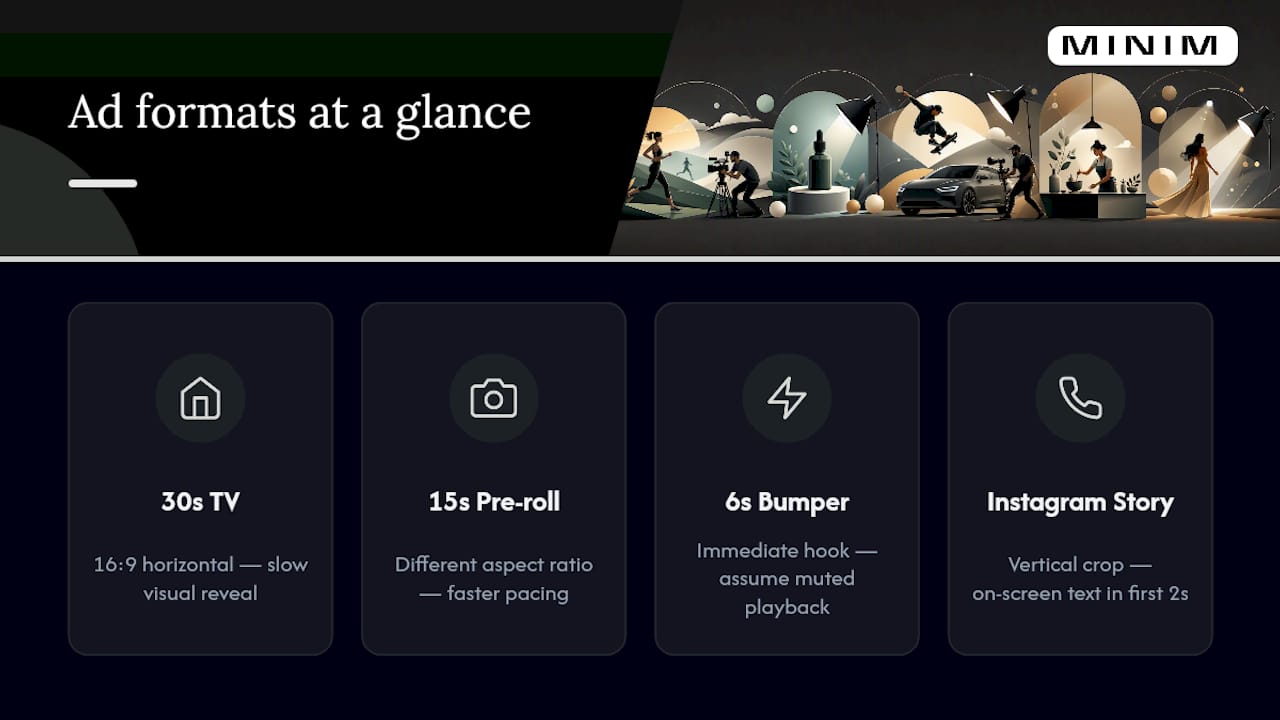
A 30-second broadcast spot and a 30-second Instagram Reel share a runtime and nothing else. TV assumes a captive, seated viewer with a screen that fills their attention; digital assumes someone scrolling with sound off, thumb hovering, ready to swipe away in under two seconds.
That changes how you write. For broadcast, you can build a slow visual reveal because the format protects your setup time. For social and digital, your hook has to work with no audio, since most feeds default to muted playback. That means burning your core message into on-screen text within the first two seconds, not relying on a clever voiceover line the viewer never hears.
Digital formats also fragment. A script written for a 15-second pre-roll needs a different aspect ratio and pacing than one built for a 6-second bumper ad or a vertical Story format. Where TV gives you one canvas (16:9, horizontal), digital often demands square or vertical crops of the same core idea, which means planning your key visual and text placement so it survives multiple aspect ratios without losing the shot.
CTAs diverge too. Broadcast CTAs point to a phone number, a tagline, or "available now," things a viewer remembers and acts on later. Digital CTAs can be immediate and clickable, "swipe up," "shop now," a link in the caption, so the script and the platform's native interaction model need to work together rather than the script pretending it's still television.
Author perspective: production-side tips from Steven Reina
- Specify camera moves only when the shot depends on them; otherwise, trust the director.
- Writers who over-direct blocking waste a director's expertise and slow every revision round.
Ready to Turn a Script Into a Finished Spot?
Writing the A/V document is one skill. Casting talent, clearing music rights, storyboarding shots, and delivering a broadcast-ready master is another set of skills entirely, and most agencies don't want to build that capacity in-house for every campaign. MINIM works as an embedded production partner, picking up wherever your script leaves off: storyboards, animatics, shoot, edit, and final deliverables across TV and digital formats.

A typical engagement starts with your script and creative brief and ends with campaign-ready assets cut for every platform you need, broadcast, social, vertical, without your team hiring a single additional producer. If you've got a script that needs a production partner behind it, start by looking at MINIM's production services and get a sense of what a project engagement looks like for your next campaign.
Frequently Asked Questions
What is the standard format for a commercial script? The industry standard is the two-column A/V format: visuals in the left column, audio (voiceover, dialog, SFX, music) in the right, with a header listing client, TRT, and draft information.
How long should a 30-second commercial script be? Most 30-second scripts run roughly 65 to 85 words, depending on pacing, but a timed read-aloud is the only reliable check.
Do I need a storyboard before I write the script, or after? After. Write the A/V script first, then build a storyboard or animatic from it to test pacing and get client approval before production.
Can one writer handle both the script and the full production? Writing a strong script doesn't require production experience, but turning it into a broadcast-ready spot, casting, shooting, editing, clearing music, usually calls for a dedicated production partner like MINIM.
What's the biggest mistake new commercial writers make? Trying to cram more than one idea or benefit into a single spot. A 15 or 30-second script only has room for one clear USP.
Sources
- How to Write a TV Commercial Script: Guide to AV Script Format - 2026 - MasterClass
- Free Commercial Script Template (TV & Digital Ads) | Boords
- TV Commercial Script Template — Example and Guide
- Scriptwriting tips for commercials and examples — Voice123
- How to Write a Commercial Script That Sells — Adwave