
Accessibility in video ads means every viewer, including people who are deaf, hard of hearing, blind, or low vision, can understand and engage with your creative regardless of how they watch it. The single most important action is this: deliver toggleable closed captions (SRT or VTT), a full transcript, and confirm the media capability of every placement before you finalize the edit. Standards from WCAG, guidance from the FCC, and platform rules published by the Ad Accessibility Network all point the same direction.
TL;DR:
- Supporting accessibility measures like captions, transcripts, and audio description significantly expand ad reach and improve message absorption across diverse audiences.
- Planning accessibility during the brief phase saves costs, prevents technical issues, and ensures proper integration into the production and delivery process.
- Different platforms require specific formats, with digital and social platforms favoring SRT/VTT files and broadcast using STL files; testing on actual placements is essential.
- Properly synchronized captions and a comprehensive transcript are the most cost-effective and impactful starting points for accessible video campaigns.
- Integrating accessibility into the production process as a core component rather than an afterthought improves quality and reduces delays or mismatches at delivery.
Table of Contents
- Why Accessibility in Video Advertising Pays Off
- The Technical Features Every Accessible Video Ad Needs
- Building Accessibility Into the Brief and Timeline
- What Each Placement Actually Supports
- Your Accessibility Checklist for Every Campaign
- What Delivering Accessible Campaigns Has Taught MINIM
- The Real Gap in How Agencies Handle Accessibility
- How MINIM Builds Accessible Video Ads Into Every Production
- Sources
Why Accessibility in Video Advertising Pays Off
The business case is simpler than most creative directors assume. Captions were built for deaf and hard of hearing viewers, but they function like a curb cut: useful for the people they were designed for, and useful for almost everyone else too. Sounds off in a waiting room, sound off on a train platform, sound off because a viewer just doesn't feel like turning the volume up. Closed captions and audio description raise the odds that visually or hearing impaired viewers actually absorb your message, and full transcripts do double duty by feeding search engines text your video otherwise hides, according to Click Rain's analysis of accessibility in paid media.
Google frames this as a reach and performance issue rather than a compliance checkbox. Its research on inclusive advertising and community partnerships found that campaigns built with diverse teams and input from disabled communities tend to widen audience reach and improve how ads land. That's a marketing argument, not just a legal one.
On the legal side, WCAG functions as guidance rather than binding statute for most private advertisers, while the FCC's rules on audio description apply more directly to broadcasters. Talk to counsel about your specific placements and jurisdiction. But even without a mandate, the math is favorable: the incremental cost of a transcript and a properly synced caption file is small next to the reach you gain and the brand risk you avoid.
The Technical Features Every Accessible Video Ad Needs
Captions and subtitles aren't interchangeable, and the difference matters for production. Captions include speaker identification and sound effects for viewers who can't hear the audio at all; subtitles assume the viewer can hear but not understand the language. Closed captions, delivered as SRT or VTT files, let viewers toggle them on or off and resize or recolor the text through their player. Open captions are burned directly into the video frame. Burned-in text might look cleaner in a mood board, but it can't be resized, recolored, or turned off, and screen readers can't parse it at all, according to Utah State University's accessibility guidance. Treat burned-in captions as a fallback for specific placements, never as your primary delivery.
A transcript should capture more than dialogue. Include on-screen text, sound effects, and music cues, because that's what lets a blind or low-vision viewer using a screen reader follow the full story, not just the words spoken aloud.
Audio description narrates visually conveyed information during natural pauses in dialogue. The FCC's consumer guidance on audio description lays out how it works and why broadcasters plan it early. When a toggled AD track isn't feasible for a placement, audio-led storytelling, where the voiceover and sound design already carry the plot, sidesteps the problem by making the visuals a bonus rather than a requirement. Producing separate audio stems during your mix makes adaptive AD versions far cheaper to build later.
On the visual side, check contrast ratios, screen for flashing content per WCAG's threshold guidance, and write real alt text for any companion static images rather than trusting auto-generated descriptions.
- Closed captions (SRT/VTT) with speaker IDs and readable pacing
- Full transcript covering speech, on-screen text, and non-speech audio
- Audio description or an audio-led script for key visual information
- Contrast checks and a flash/motion screen before final render
- Authored alt text for every companion image or social post
Pro Tip: Record your voiceover with a few extra beats of silence between lines. Those gaps are exactly where an audio description track needs room to breathe, and adding them after the fact means an expensive re-record.
Building Accessibility Into the Brief and Timeline
Retrofitting accessibility after final delivery is one of the most expensive mistakes in this business. Adding captions or AD once a broadcast master is locked can be costly and, for some formats, close to impossible, per Ad Accessibility's media capability guidance. Plan for it at the brief stage, not the delivery stage.
A solid video creative brief should spell out file formats (SRT/VTT for digital, STL for broadcast), who owns caption QC, and what "done" looks like for the transcript. Here's the sequence that keeps accessibility from becoming an afterthought:
- Pre-production: Specify caption, transcript, and AD deliverables in the brief; budget the extra edit time for stems and a description pass.
- Production: Record clean dialogue stems, capture wide shots that leave room for burned-in captions where required, and document any on-screen text for the transcript.
- Post-production: Sync captions, write the AD script, mix a separate AD-inclusive audio bed, and author the transcript.
- Clearance: Confirm rights for any sign-language talent or AD narrator, especially for reuse across markets, using the same diligence you'd apply to rights management for video.
- QC: Check caption sync and reading speed, test contrast, and render on the actual target placement before sign-off.
Pro Tip: Put a named owner for "accessibility QC" on the project timeline, the same way you'd name an owner for color grading. Shared responsibility usually means no responsibility.
What Each Placement Actually Supports
Not every platform handles accessible files the same way, and assuming otherwise is how captions disappear from a final campaign. Digital and social platforms generally support SRT files and alt text without much friction. CTV and OTT environments are inconsistent. Some players render toggleable captions cleanly; others strip them entirely, which means burned-in captions become the safer bet for that placement. Programmatic buys often inherit whatever the underlying platform supports, so check before you assume. Broadcast has its own format entirely, using STL files rather than SRT or VTT, according to Ad Accessibility's guidance on media capability.
The only reliable method is to ask each media partner directly and test a real render before the campaign goes live. Platforms that technically accept an accessible file don't always display it correctly, and Utah State's accessibility team notes that rendering behavior varies enough to warrant a check every time, not just once per platform relationship.
Build a delivery kit that covers every scenario before you need it:
- SRT/VTT files for digital and most social placements
- STL files for broadcast delivery
- Separate AD audio stems for adaptive versions
- A full transcript document for internal QC and SEO use
- Written image descriptions for any static companion assets
When a placement can't support toggled AD or closed captions at all, fall back to open captions or an audio-led script that carries the story without relying on a caption overlay.
Your Accessibility Checklist for Every Campaign
Use this sequence as a standing checklist, not a one-time exercise.
- Write accessibility deliverables into the creative brief before the shoot is scheduled.
- Budget extra post time for caption sync, transcript writing, and an AD pass.
- Record clean dialogue stems and note any visually essential information during the shoot.
- Build closed caption files with correct sync, speaker IDs, and readable pacing.
- Write the full transcript, including on-screen text and sound cues.
- Script and mix the audio description track or audio-led alternative.
- Run contrast and flash checks against WCAG thresholds.
- Test the final render on each actual target placement, not just in an editing suite.
- Package the full file set (SRT/VTT, STL, AD stems, transcript, alt text) per each partner's spec.
| Deliverable | Format | Where it's required |
|---|---|---|
| Closed captions | SRT/VTT | Most digital and social placements |
| Broadcast captions | STL | Linear TV and some CTV inventory |
| Audio description | Separate audio stem | Broadcast, some streaming platforms |
| Transcript | Text document | Internal QC, SEO, screen reader support |
| Image descriptions | Alt text | Companion social and display assets |
What Delivering Accessible Campaigns Has Taught MINIM
Building accessibility into a creative campaign development process works far better than bolting it on at the end. MINIM writes caption, transcript, and AD deliverables into the brief alongside the shot list, so the production schedule already accounts for the extra stem recording and description pass instead of treating it as a surprise line item.

The most common failure we see isn't a missing caption file. It's a caption file that was never tested on the actual placement, which means it either doesn't render or arrives out of sync. Testing the real delivery environment, not just the edit suite, catches problems while there's still time to fix them. Google's own research on inclusive advertising backs this up: campaigns built with input from disabled viewers catch design gaps that a purely internal review misses entirely.
The Real Gap in How Agencies Handle Accessibility
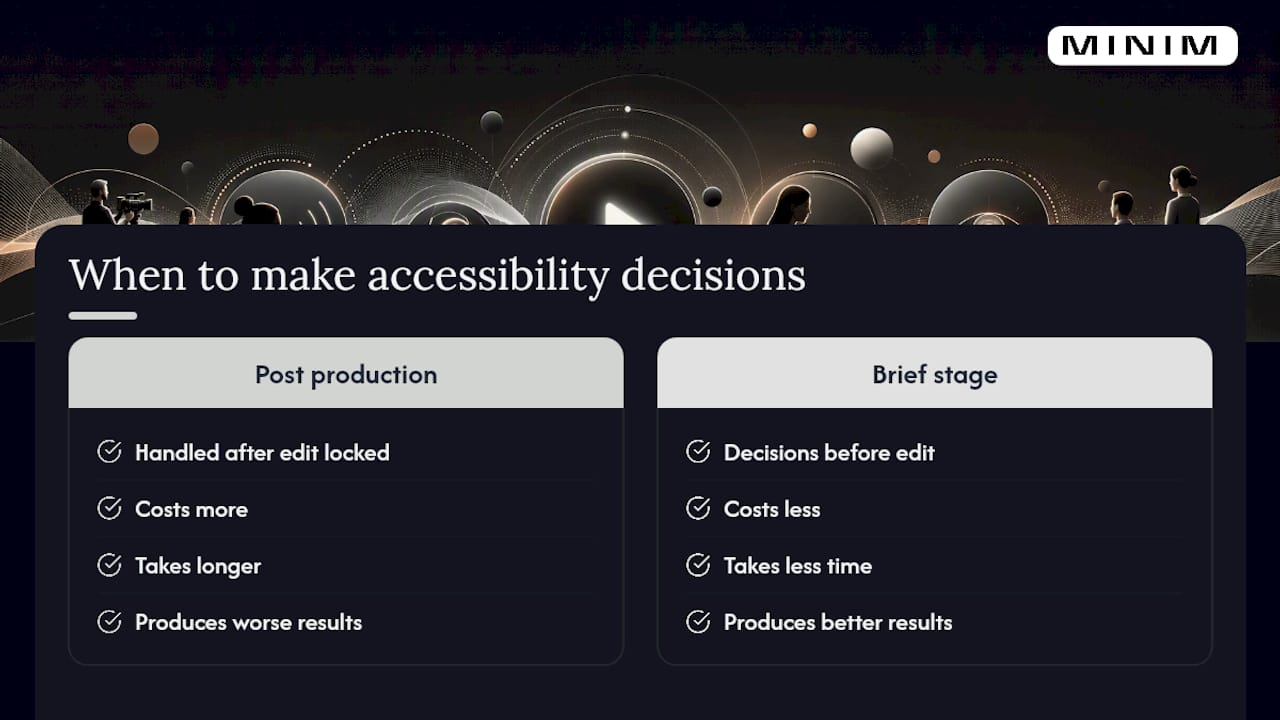
Most agencies treat accessibility as a compliance line item handled in post production, usually by whoever has time left in the schedule. That's backward. The research is consistent on this point: accessibility decisions made after the edit is locked cost more, take longer, and produce worse results than decisions made at the brief stage.
The conventional advice tells creatives to "add captions" and calls it done. That advice undersells the work. A caption file with bad sync or missing speaker IDs technically checks a box while failing the actual viewer it was meant to serve. The same goes for burned-in captions used as a universal solution instead of a placement-specific fallback.
If you take one thing from this guide, prioritize the transcript. It's the cheapest deliverable to produce, it feeds captions, AD scripts, and SEO simultaneously, and it forces your team to notice every piece of visual information a script alone would have skipped. Everything downstream gets easier once that document exists.
— Steven Reina
How MINIM Builds Accessible Video Ads Into Every Production
MINIM works as an embedded production partner, not a vendor you brief once and hope for the best. That means accessibility deliverables get specified at the brief stage, produced alongside the primary edit, and quality checked against the real placements your media team is buying, not just handled as a last-minute add-on.

Our teams handle closed captions and full transcripts, audio description scripts and stems, sign-language talent clearance, and platform-specific QC across digital, CTV, and broadcast delivery. Rights and clearance work for narrators or interpreters runs through the same process we use for any licensed talent, so nothing holds up final delivery. If your agency needs production capacity to execute accessibility correctly rather than as an afterthought, look through our services overview or browse recent campaign work to see how the process comes together. A first conversation usually starts with your existing brief. Send it over, and we'll flag what's missing before production begins.
Sources
- What are captions? | Utah State University Accessibility
- Accessibility and community partnerships | Google blog (GAAD 2024)
- Understand media capability - Ad Accessibility
- Audio description | FCC