

Deliver a mezzanine file plus three ready-to-serve MP4 renditions (high, medium, low), typically mastered at 1920x1080 resolution with a recommended minimum bitrate and audio mixed to approximately -24 LKFS within acceptable tolerance. That single workflow, submitting a transcode-ready mezzanine alongside publisher-facing files rather than one compressed export, prevents most CTV rejections and protects picture quality all the way to the living room.
TL;DR:
- Most OTT publishers prefer a 1920x1080 master resolution, with 1280x720 as a fallback when necessary.
- Ready-to-serve files must conform to strict encoding standards, including constant frame rate, moov atom placement, and proper loudness normalization at -24 LKFS.
- SSAI placements require seamless encoding with fixed GOP structure, I-frame-only splices, and exact duration to avoid playback issues.
- Confirm all publisher-specific file size limits, caption and tracking compliance, and perform device testing before final submission to prevent rejections.
Table of Contents
- What Are the Core OTT Ad Specs for Resolution, Codec, and Bitrate?
- How Do VAST, CSAI, and SSAI Change Creative File Requirements?
- What's the Right Way to Build Mezzanine and Ready-to-Serve Files?
- What Loudness and Audio Specs Do OTT Platforms Require?
- How Should Overlays and Companion Ads Be Designed for TV Screens?
- Which Publisher-Specific Rules Should You Check Before Upload?
- Studio Production Playbook: MINIM's Practical Checklist
- What Are the Standards for OTT Captions and Subtitles?
- What Are the Duration and Slot Timing Rules for OTT Ads?
- What Compliance Considerations Vary by Device and Region?
- What Are the Most Common OTT Ad Errors and How Do You Fix Them?
- What Metadata and Packaging Do OTT Ad Submissions Need?
- Common Production Pitfalls and the Workflow Fix That Matters
- How MINIM Delivers OTT-Ready Masters Without the Rework
- Sources
- FAQ
What Are the Core OTT Ad Specs for Resolution, Codec, and Bitrate?
Every publisher spec sheet reads a little differently, but they converge on the same baseline. 1920x1080 (16:9) is the preferred master resolution across nearly every major platform, with 1280x720 accepted as a fallback when infrastructure or budget forces a lower-resolution capture. Vertical or square variants only come into play for cross-posted social cutdowns, not for CTV inventory itself, since living-room screens don't render them.
Frame rate matters more than most creative teams assume. Stick to common standard frame rates such as 23.976, 24, 25, or 29.97 fps, matched to the source content, and always export with a constant frame rate rather than a variable one. Variable frame rate can cause playback issues on some devices.
For containers and codecs, MP4 with H.264 video and AAC audio is the universal accepted combination. HEVC or ProRes only belong in mezzanine files when a specific publisher's ingest pipeline explicitly accepts them for transcoding; never submit them as the ready-to-serve file.
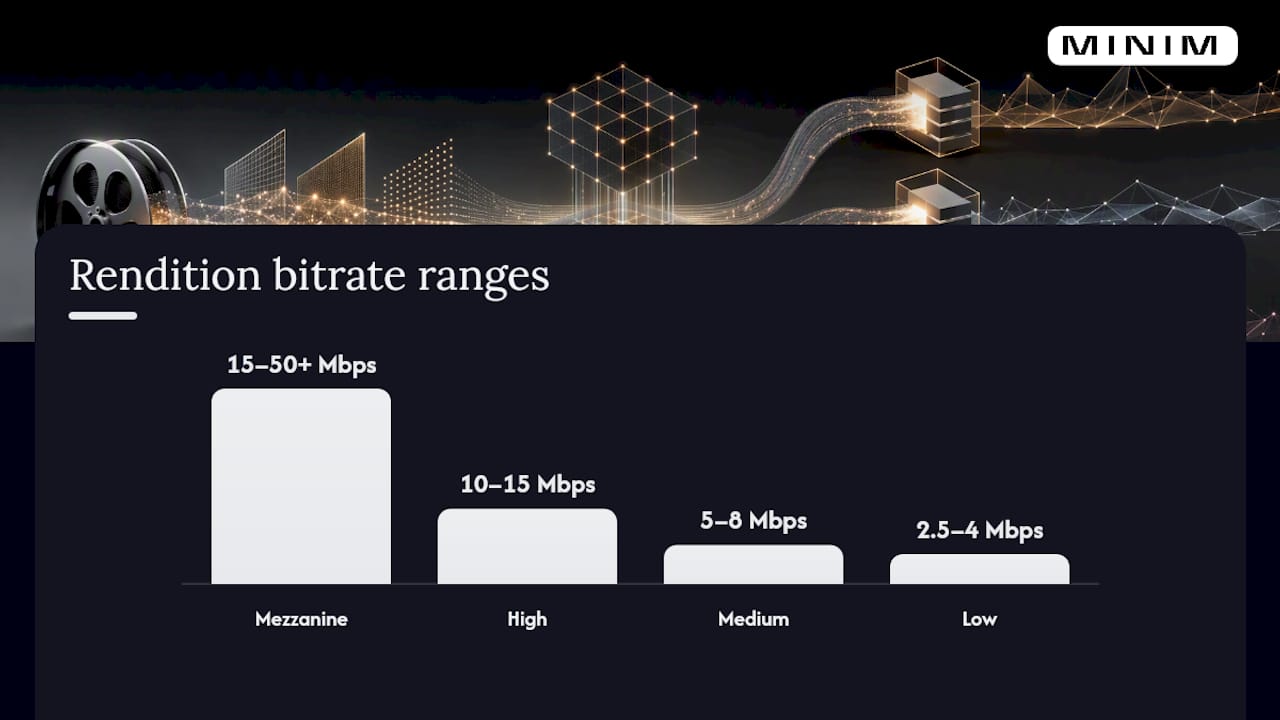
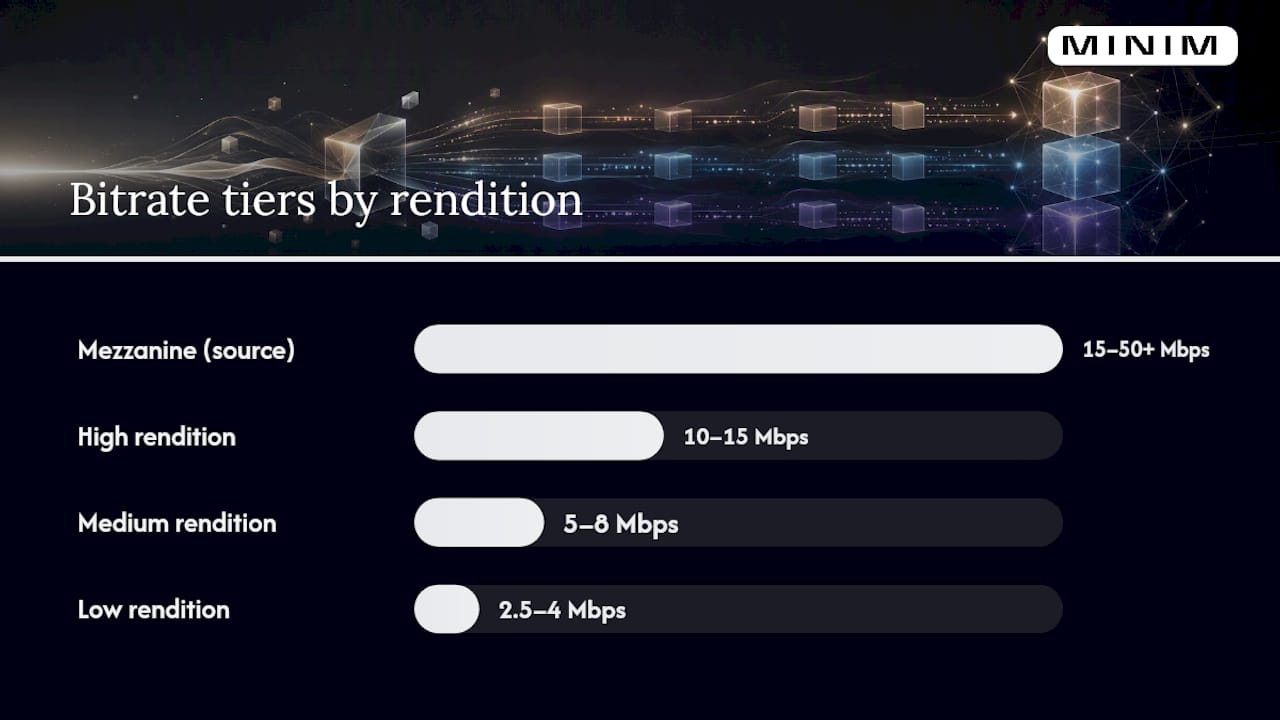
Bitrate scales with purpose. A mezzanine file should run 15 to 50 Mbps or higher to preserve maximum detail for downstream transcoding. Ready-to-serve renditions scale down from there, and Amazon Ads' Prime Video specs set a 15 Mbps minimum for direct delivery, while Display & Video 360 guidance recommends at least one CTV asset at 15 Mbps or higher.
| Rendition | Resolution | Bitrate range | Typical use |
|---|---|---|---|
| Mezzanine | 1920x1080 (or source) | 15 to 50+ Mbps | Publisher-side transcoding source |
| High | 1920x1080 | 10 to 15 Mbps | Premium CTV placements |
| Medium | 1280x720 | 5 to 8 Mbps | Standard OTT delivery |
| Low | 1280x720 or lower | 2.5 to 4 Mbps | Bandwidth-constrained delivery |
Most platforms cap ready-to-serve files around 500MB, though some CTV-first publishers allow larger uploads for high-bitrate premium placements. Confirm the ceiling before your encoding team locks settings, because a file that's technically pristine but oversized still gets bounced at ingest.
How Do VAST, CSAI, and SSAI Change Creative File Requirements?
The delivery model determines how your file gets stitched into the stream, and that changes what you need to build before export. Client-side ad insertion (CSAI) loads creative directly in the player through a VAST tag, while server-side ad insertion (SSAI) stitches the ad into the video stream server-side before it ever reaches the device. VAST itself is the tag standard, either as inline XML or a wrapper tag pointing to a hosted creative, that both models rely on to trigger playback and tracking.
SSAI imposes the tightest encoding discipline because the splice has to be seamless and device-agnostic:
- Use a closed GOP structure with a 1 to 2 second keyframe interval so the stream can cut cleanly at ad boundaries.
- Match the content's frame rate exactly and encode at constant frame rate, never variable.
- Place the moov atom at the start of the MP4 file (a "fast start" export) so playback begins without buffering delays.
- Avoid B-frames at splice points where publisher guidance calls for I-frame-only transitions.
These constraints come directly from AdContextProtocol's CTV format definitions, and skipping any one of them is a common cause of a stitched ad that freezes or skips on delivery.
CSAI and VAST-hosted creative give you more flexibility on companion assets and interactive layers, since the player handles rendering client-side, but that flexibility comes with its own limits: third-party tracking pixels must run over SSL, and companion banners need to be hosted at stable, publicly reachable URLs. Xandr's technical guidance notes that OTT enforces stricter technical rules than open web video specifically because it's protecting a premium, full-screen viewing experience, and compliant creatives consistently see stronger completion rates as a result.
What's the Right Way to Build Mezzanine and Ready-to-Serve Files?
A mezzanine-first workflow means the master file preserves everything, and every ready-to-serve rendition gets derived from that master rather than from a previously compressed export. Re-encoding a compressed file introduces generational quality loss you can't recover.
- Export the mezzanine at source resolution (1920x1080 minimum), 4:2:0 chroma subsampling for most H.264 deliverables or 4:2:2 if the publisher's pipeline supports it, at 15 to 50 Mbps or higher, in Rec. 709 color space.
- Derive the high rendition at 1920x1080, 10 to 15 Mbps.
- Derive the medium rendition at 1280x720, 5 to 8 Mbps.
- Derive the low rendition at 1280x720 or below, 2.5 to 4 Mbps.
- Name files consistently: campaign code, resolution, bitrate tier, and version number in that order (e.g.,
BRANDNAME_1080_HIGH_v2.mp4). - Attach metadata: timecode reference, slate information, and a pointer to the linked caption file.
- Confirm the moov atom sits at the front of every MP4 before final QC.
IAB Tech Lab's CTV programmatic guide recommends exactly this mezzanine-plus-three-tier structure for linear placements, since it lets publishers transcode to their own specs without touching your source quality. For VAST 4.x delivery, you can reference multiple renditions inside a single tag through nested <MediaFile> elements, letting the player select the best match for the viewing device rather than forcing you to guess which resolution wins.
Pro Tip: Keep a QC log alongside your mezzanine file that documents color space, audio channel layout, and frame rate. When an encoding partner has to re-derive a rendition six months later for a campaign refresh, that log saves hours of guesswork.
What Loudness and Audio Specs Do OTT Platforms Require?
Target -24 LKFS with a tolerance of ±2.0 dB, and keep true peak at or below -2 dBTP. That's the US standard IAB Tech Lab's ad format guidelines lay out for digital video and CTV, and it's close enough to broadcast loudness norms that a properly mixed TV spot usually clears it with minor adjustment.
Encode audio as AAC at 48 kHz, stereo for the overwhelming majority of placements. Surround formats exist in the spec conversation but remain rare in practice for standard OTT ad slots, so don't burn mix time there unless a publisher specifically requests it.
- Measure loudness with a LUFS-compliant meter (most NLEs and dedicated tools like Nugen or iZotope Insight support this natively).
- Check true peak on the final export, not just the timeline mix, since encoding can introduce peak overshoot.
- Normalize to -24 LKFS before touching true peak limiting, not after.
- Re-check loudness after any transcode, since some codecs shift levels slightly.
Platforms with massive subscriber bases, Statista's tracking shows Paramount+ alone reaching tens of millions of subscribers, make loudness consistency a scale problem: a mix that's two decibels hot doesn't just annoy one viewer, it annoys everyone watching that slot simultaneously.
The most common failure is a mix that was normalized for a phone speaker, not a home theater system, and clips on true peak the moment it hits a properly calibrated TV. The fix is almost always headroom: pull the limiter back and re-measure rather than assuming a single normalization pass covers both delivery contexts.
How Should Overlays and Companion Ads Be Designed for TV Screens?
Companion banners typically run under 200KB and stick to standard IAB display sizes (300x250, 728x90) as static JPG or PNG assets, though some publishers accept HTML5 with restrictions. The bigger design challenge is overlay placement on a screen the viewer is controlling with a remote, not a mouse.
- Keep all critical text and logos inside the title-safe zone, roughly 10% inset from every edge, to survive overscan on older television sets.
- Never place interactive elements or key messaging in the lower-right corner, where most CTV players render pause, rewind, and volume controls.
- Give any interactive overlay a minimum exposure window, generally five seconds or more, since D-pad navigation is slower than a mouse click.
- If you include a QR code, size it large enough to scan from typical couch viewing distance (8 to 10 feet), not desktop distance.
IAB Tech Lab's guidance specifically flags overscan protection as a design-from-the-start requirement, not a fix-in-post afterthought, because legacy TVs crop the outer edge of the frame more aggressively than modern displays.
Pro Tip: Always test interactive overlays on an actual TV device, not just a browser simulator. Remote-based navigation behaves differently enough that a button that looks perfectly placed on a monitor can sit unreachable on a real living-room setup. Build a fallback static end card for publishers that don't support interactivity at all.
Which Publisher-Specific Rules Should You Check Before Upload?
No two publishers apply the core specs identically. Yahoo's CTV ad specs show slightly different max file sizes and audio bitrate minimums than Amazon or Google, and that variance is exactly why a universal spec sheet only gets you most of the way to an accepted upload.
- Confirm the exact max file size for your target publisher; some cap at 500MB, others allow more for premium tiers.
- Run the VAST tag through a validator to confirm quartile tracking (start, first quartile, midpoint, third quartile, complete) fires correctly.
- Verify every third-party tracking pixel resolves over SSL; publishers reject unencrypted tracking calls outright.
- Confirm caption files are linked and formatted per publisher spec, not just present in the delivery folder.
- If the publisher supports interactivity, confirm which VAST version and companion format they actually accept, since VPAID is effectively unsupported across most CTV devices and will fail rather than gracefully degrade.
- Escalate anything ambiguous to your publisher point of contact before the buy goes live, in writing, so acceptance criteria are documented.
Device-level testing matters more here than in any other ad format. A file that validates cleanly in a desktop VAST inspector can still misbehave on an actual smart TV app, so budget time to test on at least one representative device per major platform before the campaign locks.
Studio Production Playbook: MINIM's Practical Checklist
At MINIM, we build caption requirements, styling, and safe-zone guidance into the creative brief before a single frame is shot, not after. That single habit eliminates most of the rework that happens when accessibility gets treated as a post-production add-on.
Our handoff package to encoding partners includes the mezzanine file, a QC note documenting color space and audio levels, linked caption files, and a sample VAST manifest showing how renditions map to tags. Accessibility planning gets folded into the existing creative workflow rather than bolted on as a separate line item, so agencies don't need to add headcount to hit compliance. That's the standard we hold every project to, regardless of budget.
What Are the Standards for OTT Captions and Subtitles?
Deliver captions as separate SRT or TTML files, not burned in, unless a specific publisher explicitly requires burn-in. Separate caption files give publishers the flexibility to toggle captions on or off per viewer preference, which burned-in text can't do.
IAB Tech Lab's format guidelines recommend naming caption files with a clear tie to the master timecode and including language and timing metadata in the filename or accompanying manifest. If a publisher does mandate burned-in text, for markets or placements where separate caption rendering isn't supported, deliver both versions: a clean master and a burned-in variant, rather than assuming one file satisfies every use case.
Placement matters as much as format. Keep caption text within the title-safe zone, generally centered in the lower third but never so low it collides with player controls. Font size should read clearly at typical couch viewing distance, which is considerably farther than a desktop monitor, so don't reuse web-video caption sizing without adjustment.
One detail that trips up production teams: caption timing needs to match the final delivered cut exactly, including any trims made during the mezzanine-to-ready-to-serve derivation. If editorial trims three frames off the head of the spot after captions are locked, the caption file has to be re-synced, not just re-uploaded.
What Are the Duration and Slot Timing Rules for OTT Ads?
Standard OTT ad slots run 15, 30, or 60 seconds, with 15 and 30 second spots covering the overwhelming majority of programmatic inventory. Some publishers support 6-second bumper formats for specific placements, but that's the exception rather than the default assumption for CTV buys.
Duration has to match exactly what the ad server expects for that slot, down to the frame. A 30.1 second file dropped into a 30-second slot either gets rejected outright or truncated in a way that cuts your closing frame, your call to action, or your logo. Build in a hard stop during editorial, not during encoding, so the final cut lands on the exact frame count the slot requires.
Slot timing also interacts with SSAI stitching. Since server-side insertion splices creative directly into the stream, a duration mismatch doesn't just look wrong, it can break the splice point entirely and cause a skip or freeze at the ad boundary. That's one more reason the closed-GOP, exact-duration discipline covered earlier in the SSAI section isn't optional for server-stitched placements.
What Compliance Considerations Vary by Device and Region?
Smart TV apps, mobile CTV apps, and desktop browser playback all technically accept the same core file, but they don't all render it identically. Smart TVs, particularly older models, apply more aggressive overscan cropping, which is why the safe-zone guidance covered earlier in this guide matters more for CTV than for standard web video.
Mobile CTV apps (casting from phone to TV, or watching directly in a mobile app) sometimes apply their own compression pass even after you've delivered a clean master, so a file that looks pristine in your review copy can still show minor artifacting on the actual device. Desktop browser playback is generally the most forgiving environment and the least representative of how your creative will actually appear to most CTV viewers.
Regional compliance adds another layer. Loudness targets, caption language requirements, and even acceptable ad duration can shift by market. A campaign running in multiple regions needs its audio and caption specs confirmed per market rather than assuming the US -24 LKFS target applies everywhere, since some broadcast-adjacent regions apply their own loudness standards with different tolerances. When in doubt, treat every new region as a fresh preflight check rather than extending your existing spec sheet by assumption.
What Are the Most Common OTT Ad Errors and How Do You Fix Them?
The rejection patterns repeat across almost every campaign, and most trace back to a handful of root causes.
Variable frame rate exports cause playback stutter on set-top boxes even when the file plays perfectly on a laptop. Fix it by locking constant frame rate at export and verifying with a media inspector tool before delivery, not after a publisher flags it.
Moov atom placement at the end of the file causes buffering delays or outright playback failure on progressive-download players. Most professional NLEs have a "fast start" or "web optimized" export toggle that fixes this automatically. Confirm it's checked.
Loudness drift after transcoding is subtle and easy to miss. A file that measures -24 LKFS on the mezzanine can shift after a publisher's own transcode pass. Re-measure the ready-to-serve rendition, not just the master, before final sign-off.
Caption sync mismatches after late editorial trims are one of the most preventable QA failures, since they only require someone to re-run the sync check after any picture change, however minor.
VAST tag errors, broken quartile tracking, unencrypted pixels, malformed XML, are almost always caught by running the tag through a validator before the campaign goes live rather than discovering them in the middle of a flight.
What Metadata and Packaging Do OTT Ad Submissions Need?
Every OTT submission package should include the video file itself, a linked caption file, and a metadata sheet documenting resolution, codec, bitrate, frame rate, audio loudness measurement, and duration for each rendition delivered.
Naming conventions matter more in OTT than in most other ad formats because a single campaign often ships six or more file variants (mezzanine plus three ready-to-serve tiers, sometimes duplicated across duration cuts). A consistent naming schema, campaign code, resolution, bitrate tier, version, prevents an encoding partner from accidentally serving the wrong rendition to the wrong slot.
VAST manifests should reference each rendition by its correct <MediaFile> delivery type and bitrate, and any third-party tracking URLs need to be finalized and tested before the manifest ships, not patched in afterward. Publishers increasingly expect a short QC note accompanying the package, documenting what's been verified (loudness, caption sync, frame rate) rather than assuming their own ingest QA will catch everything. That single document often determines whether a resubmission cycle takes hours or days.
Common Production Pitfalls and the Workflow Fix That Matters
Most OTT rejections trace back to one decision: treating the ready-to-serve file as the master instead of deriving it from a proper Google Ads kampány optimalizálás. On two separate campaigns, switching to mezzanine-first delivery cut resubmission cycles from three rounds to one, simply because the encoding team had headroom to fix a publisher's specific ask without re-shooting or re-grading anything. The other habit worth protecting: confirm music and talent rights clearances cover the full flight window before final delivery, not during a publisher's legal review.
— Steven Reina
How MINIM Delivers OTT-Ready Masters Without the Rework
Some production partners specialize in building CTV and OTT masters correctly on the first attempt, rather than leaving it as a checklist to enforce on freelancers. Full service production, photography and film, and 2D/3D visual effects can be managed through an integrated team that delivers mezzanine files, ready-to-serve renditions, captions, and encoding handoff notes in a coordinated workflow rather than through multiple vendors.

That matters because every extra hand-off is another chance for a loudness mismatch or a missing caption file to slip through. Agencies often partner with specialized production providers to avoid risks like loudness mismatch or missing caption files without adding headcount, and projects can be managed as premium productions regardless of budget. If you're staring down a CTV flight date and need masters that clear publisher validation on the first pass, look through MINIM's production and creative skills and start a conversation about your next campaign.
Sources
- IAB Tech Lab CTV programmatic guide
- Streaming TV & Prime Video ad specs | Amazon Ads
- Connected TV (CTV) - Display & Video 360 Help
FAQ
What Resolution Should an OTT Ad Master Be?
1920x1080 at 16:9 aspect ratio is the preferred master resolution across nearly every major CTV publisher, with 1280x720 accepted as a fallback.
What's the Difference Between a Mezzanine File and a Ready-to-Serve File?
A mezzanine file is a high-bitrate master (15 to 50+ Mbps) meant for publisher-side transcoding, while ready-to-serve files are the compressed high, medium, and low renditions actually served to viewers.
What Loudness Standard Do OTT Platforms Require?
US CTV inventory targets -24 LKFS with a tolerance of ±2.0 dB and a true peak ceiling of -2 dBTP, per IAB Tech Lab guidance.
Why Does VPAID Fail on Connected TV Devices?
VPAID is effectively unsupported across most CTV hardware, so interactive creatives should rely on VAST 2.0 through 4.x instead, confirmed against each publisher's accepted version.
Does MINIM Handle OTT Encoding and Accessibility Together?
Yes. MINIM builds caption requirements and encoding handoff notes into the production workflow from the brief stage through Full Service Production, so accessibility and technical delivery ship as one coordinated package.